Key Observability Strategies for Generative AI on AWS

You’ve built a shiny new generative AI application on AWS. It answers questions, summarizes  documents, performs autonomous tasks or workflows, maybe even writes code. But here’s the thing — how do you know it’s actually working well? Is it giving accurate answers? Is it costing you a fortune? Is it slow for some users?

That’s where observability comes in.

What Is Observability, and Why Should You Care?

Observability simply refers to the ability to monitor and understand what is occurring within your system.

For traditional apps, this means tracking errors, response times, and server health. For generative AI apps, it goes further:

– Are the model’s responses actually good and relevant?

– How long does each request take?

– How much is each API call costing you?

– Are users hitting errors or getting blocked by safety guardrails?

– Is the model hallucinating (making stuff up)?

Without observability, you’re flying blind. You won’t know something is broken until a user complains — or worse, until bad outputs cause real damage.

The Unique Challenges of Observing GenAI

Generative AI apps aren’t like regular software. They bring a few new headaches:

– Non-deterministic outputs — The same prompt can produce different answers every time. You can’t just write a unit test that checks for one correct response.

– Complex chains — Many apps use multi-step workflows. For example, they might retrieve documents, build a prompt, call a model, and then post-process the result. A failure at any step can silently degrade 

quality.

– Cost unpredictability — Token usage directly impacts your bill. A poorly written prompt can burn through tokens fast.

– Safety and compliance — You need to know if the model is producing harmful, biased, or off-

topic content.

The Key Pillars of GenAI Observability

Think of observability as resting on four pillars:

1. Traces

Track a single request as it moves through your entire system. Follow it from the user’s question, through retrieval, prompt construction, and model invocation, and back. This helps you pinpoint exactly where things slow down or break.

2. Metrics

Track the numbers that matter:

– Latency (how fast is the response?)

– Token usage (input and output tokens per request)

– Error rates

– Throttling and rate limits

– Cost per invocation

3. Logs

Capture the details — what prompt was sent, what response came back, what context was 

retrieved. Logs are your forensic tool when something goes wrong.

4. Evaluation

This is the GenAI-specific pillar. You need to measure output quality:

– Relevance — Did the answer address the question?

– Faithfulness — Is the answer grounded in the provided context, or is it hallucinated?

– Toxicity and safety — Is the output appropriate?

How AWS Helps You Build This

AWS offers several services that fit together to give you full observability over your GenAI workloads.

Amazon Bedrock — Built-in Observability Features

If you’re using Amazon Bedrock to access foundation models, you get some observability out of the box:

– Model invocation logging — Turn this on to capture every prompt and response. You can send these logs to Amazon S3 or CloudWatch Logs for analysis.

– CloudWatch metrics — Bedrock automatically publishes metrics like invocation count, latency, and errors.

– Guardrails — Bedrock Guardrails let you define safety policies and track how often content gets filtered or blocked.

Amazon CloudWatch

CloudWatch is the central hub for metrics, logs, and alarms on AWS:

– Set up dashboards to visualize model latency, error rates, and token consumption in real time.

– Create alarms that notify you when latency spikes or error rates cross a threshold.

– Use CloudWatch Logs Insights to query your invocation logs. For example, find all requests where the model took longer than 5 seconds.

AWS X-Ray

X-Ray gives you distributed tracing. If your app has multiple steps (retrieve from a knowledge base, call a model, call another model for summarization), X-Ray shows you the full journey of each request and where time is being spent.

Amazon S3 + Athena

For long-term analysis, store your invocation logs in S3 and query them with Athena. This is great for:

– Analyzing cost trends over weeks or months

– Finding patterns in low-quality responses

– Building datasets for fine-tuning or evaluation

Amazon Bedrock Evaluations

Bedrock provides built-in model evaluation capabilities that let you assess output quality using both automatic metrics and human review. You can measure things like accuracy, robustness, and toxicity without building your own evaluation pipeline from scratch.

Open-Source Integrations

AWS also plays well with popular open-source observability tools for GenAI:

– OpenTelemetry — Instrument your application code to emit traces and metrics in a vendor-neutral format. AWS Distro for OpenTelemetry (ADOT) makes this easy.

– LangSmith / LangFuse — If you’re using LangChain, these tools plug in to give you prompt-level tracing and evaluation.

A Practical Architecture

Here’s what a well-observed GenAI setup on AWS might look like:
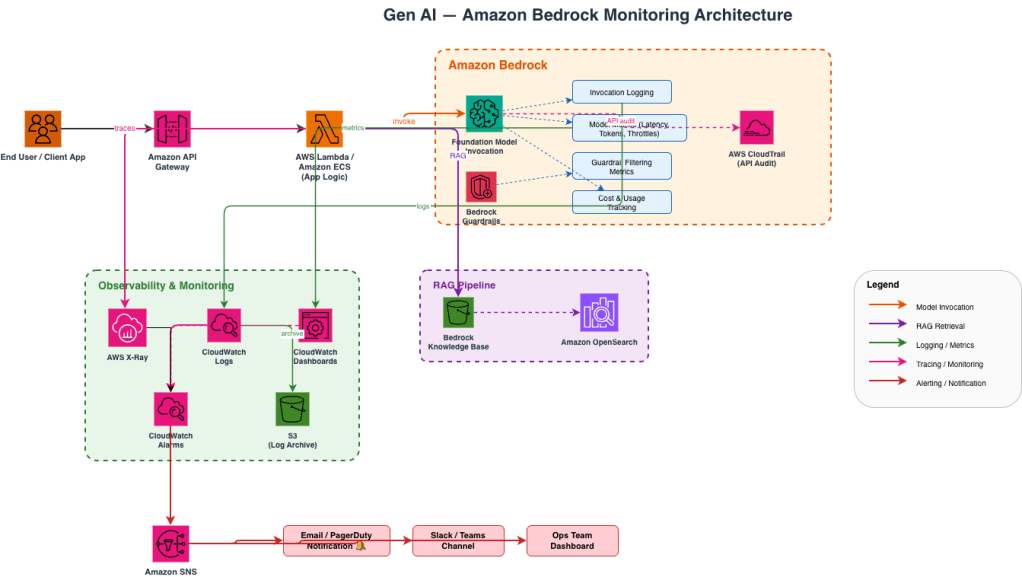
Gen AI — Amazon Bedrock Monitoring Architecture

Image 1: Generative AI Monitoring Architecture

Getting Started — A Simple Checklist

If you’re just starting out, here’s a no-nonsense checklist:

1. Turn on model invocation logging in Amazon Bedrock. Send logs to both CloudWatch and S3.

2. Set up a CloudWatch dashboard with key metrics: invocation count, latency (p50, p90, p99), errors, and token usage.

3. Enable X-Ray tracing in your application to see the full request lifecycle.

4. Create CloudWatch alarms for latency spikes and elevated error rates.

5. Enable Bedrock Guardrails if your app is user-facing, and monitor the filtering metrics.

6. Schedule periodic evaluations using Bedrock’s evaluation tools or your own test datasets.

7. Review costs weekly using token usage logs stored in S3, queried via Athena.

Final Thoughts

Generative AI is powerful, but it’s also unpredictable. The models can be brilliant one moment and confidently wrong the next. Observability is essential. It helps you build trust in your AI system. It lets you catch problems early. It also keeps costs under control. The good news is that AWS gives you the building blocks. You don’t need to build an observability platform from scratch. Turn on the logging, set up the dashboards, trace your requests, and evaluate your outputs. Start simple, then layer on more sophistication as your application matures.

Your AI is only as reliable as your ability to watch it.

Deploying Small Language Models on AWS Inferentia

Small Language Models (SLMs) like Qwen have been gaining traction. They are efficient alternatives to larger language models. They offer good performance with reduced computational requirements. In this blog, I’ll guide you through the process of hosting a Qwen model on Amazon SageMaker’s cost-effective Inferentia instances. These instances are purpose-built for machine learning inference.

Why Amazon Inferentia for SLM Hosting?

Amazon Inferentia is AWS’s custom-designed chip specifically for accelerating machine learning inference workloads. When deploying SLMs like Qwen, Inferentia instances provide several key advantages:

  1. Cost-effectiveness: Inferentia instances can reduce inference costs by up to 50% compared to equivalent GPU-based instances
  2. Optimized performance: These instances are designed specifically for ML inference, delivering high throughput at low latency
  3. Seamless integration with SageMaker: You can leverage SageMaker’s comprehensive ML deployment capabilities

Preparing Your Qwen Model for Inferentia

Before deploying to Inferentia instances, you’ll need to optimize your Qwen model for this specific hardware. SageMaker provides optimization tools that can significantly improve performance:

Step 1: Model Optimization

Amazon SageMaker’s inference optimization toolkit offers significant benefits. It delivers up to 2x higher throughput. It also reduces costs by up to 50% for models like Qwen. Here’s how to optimize your model:

import boto3

import sagemaker

from sagemaker import get_execution_role

role = get_execution_role()

sagemaker_client = boto3.client('sagemaker')

# Create an optimization job

optimization_job_name = 'qwen-inferentia-optimization'

response = sagemaker_client.create_optimization_job(

    OptimizationJobName=optimization_job_name,

    RoleArn=role,

    ModelSource={

        'S3': {

            'S3Uri': 's3://your-bucket/qwen-model/model.tar.gz',

        }

    },

    DeploymentInstanceType='ml.inf2.xlarge',

    OptimizationConfigs=[

        {

            'ModelCompilationConfig': {

                'Image': 'aws-dlc-container-uri'

            }

        }

    ],

    OutputConfig={

        'S3OutputLocation': 's3://your-bucket/qwen-optimized/'

    },

    StoppingCondition={

        'MaxRuntimeInSeconds': 3600

    }

)

Deploying the Optimized Model to Inferentia

Once your model is optimized, you can deploy it to an Inferentia instance:

Step 2: Create a SageMaker Model

 model_name = 'qwen-inferentia-model'

sagemaker_client.create_model(

    ModelName=model_name,

    PrimaryContainer={

        'Image': 'aws-inference-container-uri',

        'ModelDataUrl': 's3://your-bucket/qwen-optimized/model.tar.gz',

    },

    ExecutionRoleArn=role

)

Step 3: Create an Endpoint Configuration

endpoint_config_name = 'qwen-inferentia-config'

sagemaker_client.create_endpoint_config(

    EndpointConfigName=endpoint_config_name,

    ProductionVariants=[

        {

            'VariantName': 'default',

            'ModelName': model_name,

            'InstanceType': 'ml.inf2.xlarge',

            'InitialInstanceCount': 1

        }

    ]

)

Step 4: Create and Deploy the Endpoint


endpoint_name = 'qwen-inferentia-endpoint'

sagemaker_client.create_endpoint(

    EndpointName=endpoint_name,

    EndpointConfigName=endpoint_config_name

)

print('Endpoint is being created...')

Fine-Tuning Performance with Inference Components

For more granular control over resource allocation, you can use SageMaker inference components:

inference_component_name = 'qwen-inference-component'

sagemaker_client.create_inference_component(

    InferenceComponentName=inference_component_name,

    EndpointName=endpoint_name,

    Specification={

        'ModelName': model_name,

        'ComputeResourceRequirements': {

            'NumberOfAcceleratorDevicesRequired': 1,

            'NumberOfCpuCoresRequired': 4,

            'MinMemoryRequiredInMb': 8192

        }

    }

)

Testing the Deployed Model

You can now test your deployed Qwen model:


import boto3

import json

runtime = boto3.client('sagemaker-runtime')

payload = {"inputs": "What is Amazon SageMaker?"}

response = runtime.invoke_endpoint(

    EndpointName=endpoint_name,

    ContentType='application/json',

    Body=json.dumps(payload)

)

result = json.loads(response['Body'].read().decode())

print(result)

Performance Monitoring and Optimization

Once your Qwen model is deployed on Inferentia instances, continuously monitor its performance:

  1. Use SageMaker’s built-in metrics and logs for endpoints
  2. Conduct shadow testing to evaluate model performance against other variants
  3. Apply SageMaker’s autoscaling to handle fluctuations in inference requests

Conclusion

Hosting SLM models like Qwen on Amazon SageMaker Inferentia instances offers an excellent balance of performance and cost-effectiveness. By using SageMaker’s optimization toolkit, you can achieve significantly higher throughput. Inferentia hardware helps reduce costs compared to traditional GPU instances.

For high-traffic applications, consider implementing SageMaker’s multi-model endpoints or inference pipelines to further optimize resource utilization. Inferentia instances can deliver exceptional performance with proper optimization. These techniques are crucial for serving SLM models like Qwen in production environments.

Remember that model optimization techniques should be evaluated based on your specific needs. Test different configurations for your particular Qwen model. This will help you find the optimal balance between performance and cost.

Sources:

  1. MLSUS05-BP03 Optimize models for inference – Machine Learning Lens
  2. Machine Learning Inference – Amazon SageMaker Model Deployment – AWS

Understanding Generative AI: Benefits and Applications

Generative AI represents one of the most transformative technological developments of our time. Unlike traditional AI systems that analyze or classify existing data, generative AI creates new content that never existed before. This new content ranges from text and images to music and code.

What is Generative AI?

Generative AI refers to artificial intelligence systems. These systems are designed to produce content based on patterns learned from vast amounts of training data. These systems use sophisticated neural network architectures, particularly transformer models, to understand the underlying structure and relationships within data.

The technology works by predicting what comes next in a sequence. This could be the next word in a sentence, a pixel in an image, or a note in a musical composition. Through extensive training on diverse datasets, these models develop a nuanced understanding of language, visual concepts, or other patterns.

Foundation Models (FMs) and Their Differences from Traditional Models

Foundation models (FMs) are large pre-trained models that serve as a starting point for developing more specialized AI applications. They represent a significant evolution in machine learning architecture and capabilities.

What are Foundation Models?

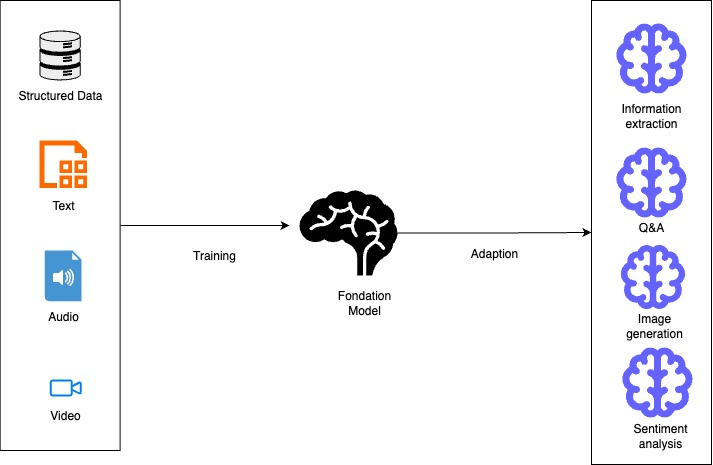
Foundation models are large-scale AI models that have been trained on massive datasets, often containing text, images, or other modalities. These models learn general patterns and representations from this data. This allows them to be adaptable to many downstream tasks without requiring complete retraining.

A foundation model is “a large pre-trained model.” It is adaptable to many downstream tasks. It often serves as the starting point for developing more specialized models. Examples include models like Llama-3-70b, BLOOM 176B, Claude, and GPT variants.

A diagram illustrating the process of training and adapting a foundation model, showcasing inputs like structured data, text, audio, and video, and outputs including information extraction, question answering, image generation, and sentiment analysis.
Diagram 1- Diagram showcasing the training and adaptation process of foundation models

Key Differences from Traditional Models

1. Training Approach

  • Foundation Models: These are pre-trained on vast, diverse datasets. They use a self-supervised or semi-supervised manner. This method allows them to learn patterns and representations without explicit labels for specific tasks.
  • Traditional Models: Typically trained from scratch for specific tasks using labeled datasets designed for those particular applications.

2. Scale and Architecture

  • Foundation Models: Enormous in size, often with billions or trillions of parameters. For example, Claude 3 Opus and Llama-3-70B have tens or hundreds of billions of parameters.
  • Traditional Models: Generally much smaller. They have parameters ranging from thousands to millions. These models are designed with specific architectures. They are optimized for particular tasks.

3. Adaptability and Transfer

  • Foundation Models: Can be adapted to multiple downstream tasks through fine-tuning, prompt engineering, or few-shot learning with minimal additional training.
  • Traditional Models: Built for specific applications and typically require complete retraining to be applied to new tasks.

4. Resource Requirements

  • Foundation Models: Require significant computational resources for training and often for inference, though smaller variants are being developed.
  • Traditional Models: Can often run on less powerful hardware, making them more accessible for deployment in resource-constrained environments.

5. Data Requirements

  • Foundation Models: Require massive datasets for pre-training but can then generalize to new tasks with relatively little task-specific data.
  • Traditional Models: Require substantial task-specific labeled data to achieve good performance.

6. Capabilities

  • Foundation Models: They can generate human-like text. They understand context across long sequences. They create images from text descriptions. They also demonstrate emergent abilities not explicitly trained for.
  • Traditional Models: Usually perform a single task or related set of tasks. Their capabilities are limited to what they were explicitly trained to do.

Foundation Models in AWS

AWS offers foundation models through services like:

  1. Amazon Bedrock: A fully managed service providing access to foundation models from providers like Anthropic, Cohere, AI21 Labs, Meta, and Amazon’s own Titan models.
  2. Amazon SageMaker JumpStart: Offers a broad range of foundation models that can be easily deployed and fine-tuned, including publicly available models and proprietary options.

Foundation models in these services can be used for various generative AI applications including content writing, code generation, question answering, summarization, classification, and image creation.

Amazon Bedrock

Amazon Bedrock is a fully managed service. It offers a simple way to build and scale generative AI applications. These applications use foundation models (FMs). Here’s how you can leverage it:

  1. Access to Multiple Foundation Models

Amazon Bedrock offers unified API access to various high-performing foundation models. These models come from leading AI companies such as Anthropic, Cohere, Meta, Mistral AI, AI21 Labs, Stability AI, and Amazon. This allows you to experiment with different models and choose the best one for your specific use case without committing to a single provider.

  1. Building Applications

You can build applications using the AWS SDK for Python (Boto3) to programmatically interact with foundation models. This involves setting up the Boto3 client, defining the model ID, preparing your input prompt, creating a request payload, and invoking the Amazon Bedrock model.

  1. Key Features and Capabilities
    • Model Customization: Fine-tune models with your data for specific use cases
    • Retrieval Augmented Generation (RAG): Enhance model responses by retrieving relevant information from your proprietary data sources
    • Agent Creation: Build autonomous agents that can perform complex tasks using the AWS CLI or CloudFormation
    • Knowledge Bases: Query your data and generate AI-powered responses using the retrieve-and-generate functionality
    • Guardrails: Implement safeguards based on your use cases and responsible AI policies
  2. Security and Privacy

Bedrock provides robust security features, including data protection measures that don’t store or log user prompts and completions. You can encrypt guardrails with customer managed keys and restrict access with least privilege IAM permissions.

  1. Deployment Options
    • On-demand: Pay-as-you-go model invocation
    • Cross-Region inference: Enhance availability and throughput across multiple regions
    • Provisioned throughput: Reserve dedicated capacity for consistent performance
  2. Integration with AWS Ecosystem

Amazon Bedrock seamlessly integrates with other AWS services, making it easy to build comprehensive AI solutions. You can use SageMaker ML features for testing different models and managing foundation models at scale.

By leveraging Amazon Bedrock, you can quickly build and deploy generative AI applications. You can maintain security, privacy, and responsible AI practices. All this is achieved without having to manage complex infrastructure.

The Future Landscape

Generative AI will continue evolving rapidly, with improvements in reasoning ability, multimodal capabilities, and specialized domain expertise. Organizations that thoughtfully integrate these technologies will likely gain significant competitive advantages in efficiency, creativity, and problem-solving.

Key Applications of Generative AI

Generative AI is already transforming numerous fields:

  • Content Creation: Generating articles, marketing copy, and creative writing
  • Visual Arts: Creating images, artwork, and designs from text descriptions
  • Software Development: Assisting with code generation and debugging
  • Customer Service: Powering intelligent virtual assistants and chatbots
  • Healthcare: Aiding in drug discovery and personalized treatment plans
  • Manufacturing: Optimizing product design and production processes

References:

  1. Build generative AI applications on Amazon Bedrock with the AWS SDK for Python (Boto3)
  2. Generative AI for the AWS SRA
  3. Build generative AI solutions with Amazon Bedrock
  4. Choosing a generative AI service
  5. Amazon Bedrock or Amazon SageMaker AI?
  6. Amazon SageMaker JumpStart Foundation Models
  7. Amazon Bedrock or Amazon SageMaker AI?
  8. Amazon Bedrock Models