Deploying Small Language Models on AWS Inferentia

Small Language Models (SLMs) like Qwen have been gaining traction. They are efficient alternatives to larger language models. They offer good performance with reduced computational requirements. In this blog, I’ll guide you through the process of hosting a Qwen model on Amazon SageMaker’s cost-effective Inferentia instances. These instances are purpose-built for machine learning inference.

Why Amazon Inferentia for SLM Hosting?

Amazon Inferentia is AWS’s custom-designed chip specifically for accelerating machine learning inference workloads. When deploying SLMs like Qwen, Inferentia instances provide several key advantages:

  1. Cost-effectiveness: Inferentia instances can reduce inference costs by up to 50% compared to equivalent GPU-based instances
  2. Optimized performance: These instances are designed specifically for ML inference, delivering high throughput at low latency
  3. Seamless integration with SageMaker: You can leverage SageMaker’s comprehensive ML deployment capabilities

Preparing Your Qwen Model for Inferentia

Before deploying to Inferentia instances, you’ll need to optimize your Qwen model for this specific hardware. SageMaker provides optimization tools that can significantly improve performance:

Step 1: Model Optimization

Amazon SageMaker’s inference optimization toolkit offers significant benefits. It delivers up to 2x higher throughput. It also reduces costs by up to 50% for models like Qwen. Here’s how to optimize your model:

import boto3

import sagemaker

from sagemaker import get_execution_role

role = get_execution_role()

sagemaker_client = boto3.client('sagemaker')

# Create an optimization job

optimization_job_name = 'qwen-inferentia-optimization'

response = sagemaker_client.create_optimization_job(

    OptimizationJobName=optimization_job_name,

    RoleArn=role,

    ModelSource={

        'S3': {

            'S3Uri': 's3://your-bucket/qwen-model/model.tar.gz',

        }

    },

    DeploymentInstanceType='ml.inf2.xlarge',

    OptimizationConfigs=[

        {

            'ModelCompilationConfig': {

                'Image': 'aws-dlc-container-uri'

            }

        }

    ],

    OutputConfig={

        'S3OutputLocation': 's3://your-bucket/qwen-optimized/'

    },

    StoppingCondition={

        'MaxRuntimeInSeconds': 3600

    }

)

Deploying the Optimized Model to Inferentia

Once your model is optimized, you can deploy it to an Inferentia instance:

Step 2: Create a SageMaker Model

 model_name = 'qwen-inferentia-model'

sagemaker_client.create_model(

    ModelName=model_name,

    PrimaryContainer={

        'Image': 'aws-inference-container-uri',

        'ModelDataUrl': 's3://your-bucket/qwen-optimized/model.tar.gz',

    },

    ExecutionRoleArn=role

)

Step 3: Create an Endpoint Configuration

endpoint_config_name = 'qwen-inferentia-config'

sagemaker_client.create_endpoint_config(

    EndpointConfigName=endpoint_config_name,

    ProductionVariants=[

        {

            'VariantName': 'default',

            'ModelName': model_name,

            'InstanceType': 'ml.inf2.xlarge',

            'InitialInstanceCount': 1

        }

    ]

)

Step 4: Create and Deploy the Endpoint


endpoint_name = 'qwen-inferentia-endpoint'

sagemaker_client.create_endpoint(

    EndpointName=endpoint_name,

    EndpointConfigName=endpoint_config_name

)

print('Endpoint is being created...')

Fine-Tuning Performance with Inference Components

For more granular control over resource allocation, you can use SageMaker inference components:

inference_component_name = 'qwen-inference-component'

sagemaker_client.create_inference_component(

    InferenceComponentName=inference_component_name,

    EndpointName=endpoint_name,

    Specification={

        'ModelName': model_name,

        'ComputeResourceRequirements': {

            'NumberOfAcceleratorDevicesRequired': 1,

            'NumberOfCpuCoresRequired': 4,

            'MinMemoryRequiredInMb': 8192

        }

    }

)

Testing the Deployed Model

You can now test your deployed Qwen model:


import boto3

import json

runtime = boto3.client('sagemaker-runtime')

payload = {"inputs": "What is Amazon SageMaker?"}

response = runtime.invoke_endpoint(

    EndpointName=endpoint_name,

    ContentType='application/json',

    Body=json.dumps(payload)

)

result = json.loads(response['Body'].read().decode())

print(result)

Performance Monitoring and Optimization

Once your Qwen model is deployed on Inferentia instances, continuously monitor its performance:

  1. Use SageMaker’s built-in metrics and logs for endpoints
  2. Conduct shadow testing to evaluate model performance against other variants
  3. Apply SageMaker’s autoscaling to handle fluctuations in inference requests

Conclusion

Hosting SLM models like Qwen on Amazon SageMaker Inferentia instances offers an excellent balance of performance and cost-effectiveness. By using SageMaker’s optimization toolkit, you can achieve significantly higher throughput. Inferentia hardware helps reduce costs compared to traditional GPU instances.

For high-traffic applications, consider implementing SageMaker’s multi-model endpoints or inference pipelines to further optimize resource utilization. Inferentia instances can deliver exceptional performance with proper optimization. These techniques are crucial for serving SLM models like Qwen in production environments.

Remember that model optimization techniques should be evaluated based on your specific needs. Test different configurations for your particular Qwen model. This will help you find the optimal balance between performance and cost.

Sources:

  1. MLSUS05-BP03 Optimize models for inference – Machine Learning Lens
  2. Machine Learning Inference – Amazon SageMaker Model Deployment – AWS

Customizing Foundation Models: A Guide to Fine-Tuning

In today’s rapidly evolving artificial intelligence landscape, foundation models have revolutionized what’s possible with machine learning. These powerful, pre-trained models serve as the backbone for countless applications across industries. However, to truly unlock their potential for specific business needs, customization is often necessary. Let me walk you through the key approaches to fine-tuning foundation models for your specific use cases.

Understanding Foundation Models and the Need for Customization

Foundation models are extremely powerful models trained on vast datasets that can solve a wide array of tasks. However, to achieve optimal results for specific business applications, some form of customization is typically required to align the model with your unique requirements.

Diagram illustrating the process of fine-tuning foundation models.

The Customization Spectrum: From Prompt Engineering to Fine-Tuning

When customizing foundation models, it’s best to start with simpler approaches before moving to more complex ones:

1. Prompt Engineering

As we discussed in our previous blog, the recommended first step in customization is prompt engineering. By providing well-crafted, context-rich prompts, you can often achieve desired results without any model weight modifications. This approach is cost-effective and requires no additional training infrastructure.

2. Fine-tuning Foundation Models

If prompt engineering doesn’t yield satisfactory results, fine-tuning becomes the next logical step. Fine-tuning involves further training a pre-trained model on domain-specific data to adapt it to your particular use case.

Types of Fine-Tuning Approaches

Domain Adaptation

This approach involves training the model on data specific to your domain or industry. It helps the model learn the vocabulary, concepts, and patterns relevant to your field.

Instruction-based Fine-Tuning

This technique focuses on teaching the model to follow specific instructions or perform particular tasks by training it on examples of instructions paired with desired outputs.

Fine-Tuning with AWS Services

Amazon SageMaker provides comprehensive support for fine-tuning foundation models:

Using SageMaker Unified Studio

SageMaker Unified Studio offers a collection of foundation models for various use cases, including content writing, code generation, and question answering. Models like Meta Llama 4 Maverick 17B and Stable Diffusion 3.5 Large can be fine-tuned through this platform.

The fine-tuning process involves:

  1. Signing in to Amazon SageMaker Unified Studio
  2. Selecting a model to train
  3. Creating a training job from the model details page
  4. Either using the default training dataset or providing a custom dataset URI
  5. Optionally updating hyperparameters and specifying training instance types
  6. Submitting the training job

Low-Rank Adaptation (LoRA)

LoRA is a cost-effective fine-tuning technique offered through SageMaker AI. It works on the principle that only a small part of a large foundation model needs updating to adapt it to new tasks or domains. A LoRA adapter augments the inference from a base foundation model with just a few extra adapter layers, making it more efficient than full model fine-tuning.

Fine-tuning Models with Amazon Bedrock

Amazon Bedrock offers powerful capabilities to fine-tune foundation models for your specific business needs. Here’s a comprehensive guide on how to use Bedrock for model fine-tuning:

Using Amazon Bedrock

Amazon Bedrock supports two main customization methods:

  1. Fine-tuning: This involves providing labeled data to train a model on specific tasks. The model learns to associate certain types of outputs with specific inputs, with parameters adjusted accordingly. Fine-tuning is ideal when you need high accuracy for domain-specific tasks.
  2. Continued pre-training: This method uses unlabeled data to familiarize the model with specific domains or topics. It’s useful when working with proprietary data not publicly available for training.

Supported Models for Fine-tuning
Currently, fine-tuning is available for several models including:

  • Command
  • Llama 2
  • Amazon Titan Text Lite and Express
  • Amazon Titan Image Generator
  • Amazon Titan Multimodal Embeddings models

Commonly Used Hyperparameters for Fine-Tuning

When fine-tuning foundation models, you can customize various hyperparameters:

  • Epoch: The number of complete passes through the training dataset
  • Learning rate: Controls how much to change the model in response to estimated errors
  • Batch size parameters: Controls how many samples are processed before updating model weights
  • Max input length: Defines the maximum length of input sequences
  • LoRA parameters: For adapting specific parts of the model efficiently

Evaluating Fine-tuned Models

To assess the effectiveness of your fine-tuned model, consider metrics such as:

  • BERTScore: Evaluates semantic similarity between generated and reference texts
  • Inference latency: Measures the response time of the model
  • Cost analysis: Evaluates the financial implications of using the model

Choosing the Right Approach: RAG, Fine-tuning, or Hybrid

When customizing models, consider these approaches:

  1. Retrieval-Augmented Generation (RAG): Connects models to external knowledge sources, enhancing responses without modifying the model.
  2. Fine-tuning: Adjusts model parameters using labeled data for your specific task.
  3. Hybrid Approach: Combines RAG and fine-tuning for highly accurate, context-aware responses.

The choice depends on your specific needs, available data, and resources. For example, if you have limited labeled data but extensive knowledge bases, RAG might be more appropriate. If you have substantial domain-specific data and require high customization, fine-tuning could be better.

Conclusion

Fine-tuning foundation models allows organizations to leverage the power of general-purpose AI while tailoring it to their specific requirements. By following a systematic approach—starting with prompt engineering and progressing to more sophisticated fine-tuning techniques when needed—you can create customized models that deliver superior performance for your use cases.

Whether you’re improving accuracy, reducing latency, or enabling domain-specific capabilities, the customization options available through AWS services like SageMaker provide the flexibility and power needed to transform foundation models into purpose-built solutions for your business needs.

Sources:

  1. Get started fine-tuning foundation models in Amazon SageMaker Unified Studio
  2. Foundation models and hyperparameters for fine-tuning
  3. Fine-tune models with adapter inference components
  4. Foundation model customization
  5. Tailoring foundation models for your business needs: A comprehensive guide to RAG, fine-tuning, and hybrid approaches

Unlocking AI Potential: The Art of Prompt Engineering


In the rapidly evolving landscape of generative AI, the ability to craft effective prompts has emerged as a crucial skill. Prompt engineering—the art and science of formulating instructions for AI models—can be the difference between receiving mediocre outputs and generating remarkably useful content. This blog explores the fundamentals of prompt engineering and provides practical strategies to enhance your interactions with AI models.

Understanding the Prompt-Response Relationship

At its core, prompt engineering is about clear communication. AI models interpret your instructions through the lens of their training data and respond based on patterns they’ve learned. Think of prompts as conversations with a highly knowledgeable but extremely literal colleague who needs precise instructions to deliver what you need.

Key Principles for Effective Prompts

Be Specific and Clear

Vague prompts yield vague responses. Instead of asking “Tell me about cloud computing,” try “Explain the key differences between IaaS, PaaS, and SaaS in cloud computing, with one example of each.” The specificity guides the model toward the exact information you seek.

Provide Context

AI models lack the situational awareness humans naturally possess. Providing relevant context helps the model generate more appropriate responses. For instance, specify whether you’re writing for technical experts or beginners, or include background information about a specific domain.

Structure Your Requests

Breaking complex requests into structured components helps models organize their responses. Consider using numbered points or clear sections in your prompt. For example: “Create a product description for a wireless headset. Include: 1) Key technical specifications, 2) Three main benefits, and 3) Target audience.”

Set the Tone and Format

Models can adapt to different communication styles, but you need to specify what you want. Explicitly request formal or conversational tone, technical or simplified language, or specific output formats like bullet points, paragraphs, or code snippets.

Advanced Techniques

Role Prompting

Assigning a role to the model can dramatically improve outputs for specialized tasks. For example: “As an experienced software architect, review this system design and identify potential scalability issues.” This technique leverages the model’s understanding of how different professionals approach problems.

Few-Shot Learning

Providing examples within your prompt demonstrates the pattern you want the model to follow. For instance, if you want a specific question-answer format, include 2-3 examples before asking for additional responses. This shows rather than tells the model what you expect.

Iterative Refinement

Prompt engineering is rarely perfect on the first try. Start with a basic prompt, evaluate the response, then refine your instructions based on what worked and what didn’t. This iterative approach leads to increasingly better results.

Common Pitfalls to Avoid

Overcomplicating Instructions

While details help, excessive complexity can confuse models. Balance specificity with clarity, focusing on essential requirements rather than overwhelming the model with constraints.

Assuming Technical Understanding

Even advanced models may struggle with highly specialized jargon without proper context. Define unusual terms or provide references when working in niche domains.

Neglecting Ethical Boundaries

Consider the ethical implications of your prompts. Responsible prompt engineering involves respecting privacy, avoiding harmful outputs, and ensuring factual accuracy.

Practical Applications

Effective prompt engineering enhances numerous workflows:

  • Content creation becomes more efficient when you precisely specify tone, audience, and purpose
  • Technical documentation can be drafted faster with well-structured prompts about functionality and use cases
  • Problem-solving benefits from prompts that clearly define constraints and desired outcomes
  • Learning new concepts improves when you structure prompts to build on your existing knowledge

Advanced Prompt Engineering Techniques

Building on our previous discussion about prompt engineering basics, let’s explore more sophisticated techniques that can significantly enhance your interactions with AI models.

Prompt Patterns and Templates

Beyond the basic principles we’ve already covered, several powerful prompt patterns can yield better results:

Chain-of-Thought Prompting

Guide the model through step-by-step reasoning by explicitly asking it to “think through this step by step” or “reason through this problem.” This technique dramatically improves performance on complex reasoning tasks by encouraging the model to break down problems into manageable components.

e.g.- “Analyze the impact of this company’s recent 15% revenue increase alongside a 20% increase in operating expenses. Think through each step to determine if this represents a positive or negative trend for overall profitability.”

Tree-of-Thought Prompting

Similar to chain-of-thought, but explores multiple reasoning paths simultaneously. Ask the model to consider different approaches to a problem and evaluate the merits of each before arriving at a conclusion.

e.g.- “We need to determine whether to launch our product in Market A or Market B. Consider the following decision paths: Path 1: Analyze based on potential market size and growth rate Path 2: Analyze based on existing competition and barriers to entry Path 3: Analyze based on our company’s current capabilities and resources For each path, identify the key considerations, evaluate the pros and cons, and then synthesize these analyses to recommend the optimal market entry strategy.”

Retrieval Augmented Generation (RAG)

When working with domain-specific knowledge, provide relevant information within your prompt. This creates context that helps the model generate more accurate and informed responses.

How RAG Works

RAG combines two fundamental processes:

  1. Retrieval: A semantic search mechanism identifies relevant content from curated knowledge sources such as internal documents, product manuals, or case logs. This typically leverages vector embeddings to find contextually relevant information.
  2. Generation: The retrieved context is provided as part of the prompt to the LLM, allowing it to craft an answer grounded in that authoritative information.

This two-step process enables “closed-book” foundation models to act as if they had access to your live, curated enterprise data, without requiring model retraining.

Zero-shot, One-shot, and Few-shot Learning

These refer to providing different levels of examples:

  • Zero-shot: No examples provided, just instructions
  • One-shot: A single example before your request
  • Few-shot: Multiple examples establishing a pattern

Advanced Control Techniques

Control Max Token Length

Set explicit limits on response length either in your configuration or directly in your prompt. For example: “Explain quantum computing in exactly three paragraphs” or “Provide a 50-word summary.”

Use Variables in Prompts

Create reusable prompt templates with placeholders that can be filled with different inputs. This is particularly valuable when building applications that interact with AI models repeatedly.

Request Structured Output

When you need data in a specific format, explicitly request it. For example:

“Provide your analysis in JSON format with the following fields: key_findings, recommendations, and risk_level.”

Optimization Strategies

Experiment and Iterate

The most successful prompt engineers continuously refine their approaches. Track what works, what doesn’t, and systematically improve your prompts through deliberate experimentation.

Adapt to Model Updates

As AI models evolve, prompting strategies should too. Techniques that work well on one version may need adjustment for newer versions.

Document Your Experiments

Maintain records of your prompt attempts, configurations, outputs, and observations. This documentation helps identify patterns and refine strategies over time.

Collaborative Prompting

Exchange ideas with other prompt engineers. Different perspectives often lead to innovative approaches that may not have occurred to you individually.

Advanced Applications

Meta-Prompting

Ask the model to help improve your prompts. For example: “How would you modify this prompt to get better results for [specific task]?”

System and User Role Definition

Clearly define the role of both the model and yourself in the interaction. This establishes expectations and guides the model’s response style.

Temperature and Sampling Controls

Adjust these parameters to balance creativity versus determinism in responses. Lower temperature settings (closer to 0) produce more consistent and predictable outputs. Higher values (closer to 1) increase randomness and creativity.

Incorporate these advanced techniques into your prompt engineering toolkit. You’ll manage to achieve more precise results from AI models. The outcomes will be useful and reliable across a wide range of applications.

Temperature Controls

Temperature is a scaling factor applied within the final softmax layer of an AI model that directly affects the randomness of outputs. It works by influencing the shape of the probability distribution that the model calculates:

Temperature typically ranges from 0 to 1, with each setting producing dramatically different results:

Lower Temperature (0 ~ 0.5) :

  • Creates a more peaked probability distribution
  • Concentrates probability in fewer words
  • Produces more predictable, deterministic outputs
  • Ideal for factual, precise responses where consistency matters

Higher Temperature (~ 1):

  • Softens the probability distribution, making it more uniform
  • Gives lower probability tokens a higher chance of being selected
  • Generates more diverse, creative, and sometimes unexpected responses
  • Better for creative writing, brainstorming, or generating varied options

For example, at a very low temperature, if the model predicts the next word in “A golden ale on a summer ___” with probabilities for “day” (30%), “night” (10%), and “moon” (5%), it would almost always choose “day.” At higher temperatures, “night” and “moon” become increasingly likely to be selected.

Sampling Methods

While temperature controls the probability distribution, sampling methods determine how tokens are actually selected from that distribution:

  1. Greedy Sampling: Always selects the highest probability token (effectively what happens at very low temperatures)
  2. Random Sampling: Selects tokens based on their probability weightings, introducing variability
  3. Top-p (Nucleus) Sampling: Only considers the smallest set of tokens whose cumulative probability exceeds a threshold p
  4. Top-k Sampling: Only considers the k most likely next tokens

These controls are typically exposed through API parameters when working with generative AI models. For network engineers and other technical professionals using these models, understanding these parameters helps optimize results for specific use cases.

The default temperature value is typically 1.0, representing a balance between deterministic and creative outputs.

Conclusion

Prompt engineering is rapidly becoming an essential skill in our AI-augmented world. By applying these fundamental principles, you can significantly improve your interactions with AI models, transforming them from interesting novelties into powerful productivity tools that enhance your work and creative endeavors.

As you continue experimenting with different prompting techniques, you’ll develop an intuitive sense for what works best for various tasks and models. This skill will only grow more valuable as AI capabilities continue to advance.


Understanding Generative AI: Benefits and Applications

Generative AI represents one of the most transformative technological developments of our time. Unlike traditional AI systems that analyze or classify existing data, generative AI creates new content that never existed before. This new content ranges from text and images to music and code.

What is Generative AI?

Generative AI refers to artificial intelligence systems. These systems are designed to produce content based on patterns learned from vast amounts of training data. These systems use sophisticated neural network architectures, particularly transformer models, to understand the underlying structure and relationships within data.

The technology works by predicting what comes next in a sequence. This could be the next word in a sentence, a pixel in an image, or a note in a musical composition. Through extensive training on diverse datasets, these models develop a nuanced understanding of language, visual concepts, or other patterns.

Foundation Models (FMs) and Their Differences from Traditional Models

Foundation models (FMs) are large pre-trained models that serve as a starting point for developing more specialized AI applications. They represent a significant evolution in machine learning architecture and capabilities.

What are Foundation Models?

Foundation models are large-scale AI models that have been trained on massive datasets, often containing text, images, or other modalities. These models learn general patterns and representations from this data. This allows them to be adaptable to many downstream tasks without requiring complete retraining.

A foundation model is “a large pre-trained model.” It is adaptable to many downstream tasks. It often serves as the starting point for developing more specialized models. Examples include models like Llama-3-70b, BLOOM 176B, Claude, and GPT variants.

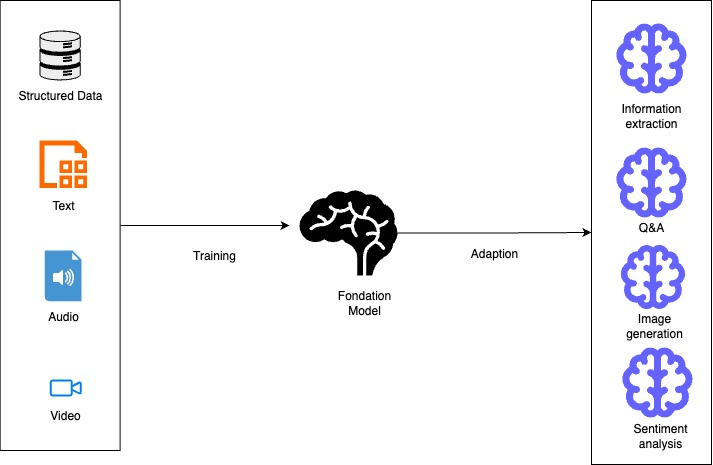
A diagram illustrating the process of training and adapting a foundation model, showcasing inputs like structured data, text, audio, and video, and outputs including information extraction, question answering, image generation, and sentiment analysis.
Diagram 1- Diagram showcasing the training and adaptation process of foundation models

Key Differences from Traditional Models

1. Training Approach

  • Foundation Models: These are pre-trained on vast, diverse datasets. They use a self-supervised or semi-supervised manner. This method allows them to learn patterns and representations without explicit labels for specific tasks.
  • Traditional Models: Typically trained from scratch for specific tasks using labeled datasets designed for those particular applications.

2. Scale and Architecture

  • Foundation Models: Enormous in size, often with billions or trillions of parameters. For example, Claude 3 Opus and Llama-3-70B have tens or hundreds of billions of parameters.
  • Traditional Models: Generally much smaller. They have parameters ranging from thousands to millions. These models are designed with specific architectures. They are optimized for particular tasks.

3. Adaptability and Transfer

  • Foundation Models: Can be adapted to multiple downstream tasks through fine-tuning, prompt engineering, or few-shot learning with minimal additional training.
  • Traditional Models: Built for specific applications and typically require complete retraining to be applied to new tasks.

4. Resource Requirements

  • Foundation Models: Require significant computational resources for training and often for inference, though smaller variants are being developed.
  • Traditional Models: Can often run on less powerful hardware, making them more accessible for deployment in resource-constrained environments.

5. Data Requirements

  • Foundation Models: Require massive datasets for pre-training but can then generalize to new tasks with relatively little task-specific data.
  • Traditional Models: Require substantial task-specific labeled data to achieve good performance.

6. Capabilities

  • Foundation Models: They can generate human-like text. They understand context across long sequences. They create images from text descriptions. They also demonstrate emergent abilities not explicitly trained for.
  • Traditional Models: Usually perform a single task or related set of tasks. Their capabilities are limited to what they were explicitly trained to do.

Foundation Models in AWS

AWS offers foundation models through services like:

  1. Amazon Bedrock: A fully managed service providing access to foundation models from providers like Anthropic, Cohere, AI21 Labs, Meta, and Amazon’s own Titan models.
  2. Amazon SageMaker JumpStart: Offers a broad range of foundation models that can be easily deployed and fine-tuned, including publicly available models and proprietary options.

Foundation models in these services can be used for various generative AI applications including content writing, code generation, question answering, summarization, classification, and image creation.

Amazon Bedrock

Amazon Bedrock is a fully managed service. It offers a simple way to build and scale generative AI applications. These applications use foundation models (FMs). Here’s how you can leverage it:

  1. Access to Multiple Foundation Models

Amazon Bedrock offers unified API access to various high-performing foundation models. These models come from leading AI companies such as Anthropic, Cohere, Meta, Mistral AI, AI21 Labs, Stability AI, and Amazon. This allows you to experiment with different models and choose the best one for your specific use case without committing to a single provider.

  1. Building Applications

You can build applications using the AWS SDK for Python (Boto3) to programmatically interact with foundation models. This involves setting up the Boto3 client, defining the model ID, preparing your input prompt, creating a request payload, and invoking the Amazon Bedrock model.

  1. Key Features and Capabilities
    • Model Customization: Fine-tune models with your data for specific use cases
    • Retrieval Augmented Generation (RAG): Enhance model responses by retrieving relevant information from your proprietary data sources
    • Agent Creation: Build autonomous agents that can perform complex tasks using the AWS CLI or CloudFormation
    • Knowledge Bases: Query your data and generate AI-powered responses using the retrieve-and-generate functionality
    • Guardrails: Implement safeguards based on your use cases and responsible AI policies
  2. Security and Privacy

Bedrock provides robust security features, including data protection measures that don’t store or log user prompts and completions. You can encrypt guardrails with customer managed keys and restrict access with least privilege IAM permissions.

  1. Deployment Options
    • On-demand: Pay-as-you-go model invocation
    • Cross-Region inference: Enhance availability and throughput across multiple regions
    • Provisioned throughput: Reserve dedicated capacity for consistent performance
  2. Integration with AWS Ecosystem

Amazon Bedrock seamlessly integrates with other AWS services, making it easy to build comprehensive AI solutions. You can use SageMaker ML features for testing different models and managing foundation models at scale.

By leveraging Amazon Bedrock, you can quickly build and deploy generative AI applications. You can maintain security, privacy, and responsible AI practices. All this is achieved without having to manage complex infrastructure.

The Future Landscape

Generative AI will continue evolving rapidly, with improvements in reasoning ability, multimodal capabilities, and specialized domain expertise. Organizations that thoughtfully integrate these technologies will likely gain significant competitive advantages in efficiency, creativity, and problem-solving.

Key Applications of Generative AI

Generative AI is already transforming numerous fields:

  • Content Creation: Generating articles, marketing copy, and creative writing
  • Visual Arts: Creating images, artwork, and designs from text descriptions
  • Software Development: Assisting with code generation and debugging
  • Customer Service: Powering intelligent virtual assistants and chatbots
  • Healthcare: Aiding in drug discovery and personalized treatment plans
  • Manufacturing: Optimizing product design and production processes

References:

  1. Build generative AI applications on Amazon Bedrock with the AWS SDK for Python (Boto3)
  2. Generative AI for the AWS SRA
  3. Build generative AI solutions with Amazon Bedrock
  4. Choosing a generative AI service
  5. Amazon Bedrock or Amazon SageMaker AI?
  6. Amazon SageMaker JumpStart Foundation Models
  7. Amazon Bedrock or Amazon SageMaker AI?
  8. Amazon Bedrock Models

Modernizing Legacy .Net apps on AWS using AWS App Runner

Modernizing legacy apps is an important aspect in running a successful business. AWS provides plethora of services to modernize and host your legacy .net apps. With AWS your modernization decisions can be based on your business needs rather than licensing or agreement. With AWS you can choose your legacy .Net apps to Rehost, Re-platofrm or Refactor/Rearchitect to AWS services.
Following are the various approaches to modernize the legacy apps. We are not discussing the reshot (Lift and Shift) approach in this blog rather we’ll be focussing on refactor and rearchitect approach.

Pathways of Modernisation:

  1. Re-platform/Refactor Front End Layer(Web Layer on ASP.Net) on Elastic Beanstalk
    1. The web layer can be hosted on Elastic Beanstalk. Elastic Beanstalk is a fully managed service to host web applications. Some of the use cases are as follows:
      1. Host Web Apps
      2. Host API services
      3. Host Web backends
  2. Refactor the Front End Layer(Web Layer on ASP.Net) on Elastic Container Service
    1. The web layer can also be containerized and hosted on ECS. ECS is a fully managed AWS container orchestration service that makes the management, deployment and scaling of the containerised apps easy. With ECS you can launch, monitor and scale your app across various platforms/compute options easily.
  3. Refactor/Rearchitect the Front End Layer(Web Layer on ASP.Net) on AWS App Runner
    1. AWS App Runner is the fully managed service by AWS that lets you build, deploy and run web app without having prior experience on containers or infrastructure. AWS App Runner builds and deploys web applications automatically, load balances traffic with encryption, scales to meet your traffic needs, and allows for the configuration of how services are accessed and communicate with other AWS applications in a private Amazon VPC

Modernize and deploy .Net App on AWS App Runner

In this section, we’ll host and deploy our .Net web app using AWS App Runner. The source code is stored in GitHub. We’ll enable auto deployment from GitHub so the app is deployed as soon as there is a change pushed to repo.

Step 1: Create a AWS App Runner service and select GitHub as source code repo, select the required repo from GitHub after making successful connection to GitHub

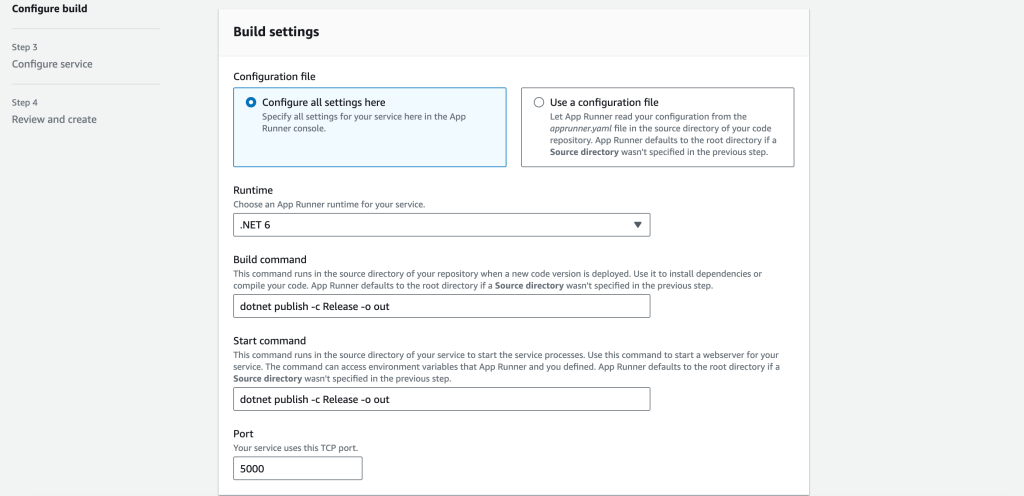
Step 2: Choose the run time (.Net 6) and specify the build and publish commands dotnet publish -c Release -o out and dotnet publish -c Release -o out

Step 3: Configure the service and specify the connection string (it must be stored in AWS Secret Manager)

Step 4: Provide the DB VPC by selecting custom VPC and creating VPC connector-

Step 6: Once published successfully, the web app can be accessed using the public URL-

Conclusion: In this blog, we have discussed what are some of the services provided by AWS to host and deploy the legacy .Net apps on AWS native services. We also discussed how AWS APP Runner can be used to host ASP.Net Web App and implementing Continuous Deployment from GitHub automatically.

Refrences

  1. https://docs.aws.amazon.com/prescriptive-guidance/latest/patterns/modernize-asp-net-web-forms-applications-on-aws.html
  2. https://aws.amazon.com/developer/language/net/
  3. https://aws.amazon.com/enterprise/modernization/

AWS: Journey to Cloud- From Rehost to Cloud Native

Migration to cloud for an enterprise is a journey rather than one stop destination. This journey has mainly following stops

  • Rehost– This is the easiest way to migrate to cloud. But using this way you cannot take most of the advantages the cloud offers like Cost, Availability, Scalability, Performance etc.
  • Refactor– When the application is re-factored to the minimum extent to be migrated to Platform-as-a-Service or managed services. This includes removing any hardware or 3rd party dependencies, refactoring the logging and caching strategy etc.
  • Re-architect– When the app is completely re-architectured to a cloud native, serverless or microservice based architecture to move from its legacy architecture. Even though it maybe the ultimate destination for an organization but it is extremely expensive and time consuming.

As we discussed above, this journey to cloud is an continuous one. The organization should go with a phased approach rather than going for bing bang re-architecture approach taking a balanced approach.

background

In this article we will discuss journey to cloud for an imaginary company ABC Inc. The ABC Inc. is the major telecommunication company of the country. It has strong local presence with global ambitions. We are helping them in devising the road-map for their strategic Journey to Cloud initiative. The Rehost is out of scope as the customer doesn’t want to go with this approach. The ABC Inc. would like to migrate their online customer portal to cloud that allows customers to check their account, change plans, monitor usage and pay bills. The primary driver for the migration is to address the recent performance issues at peak load.

Current State

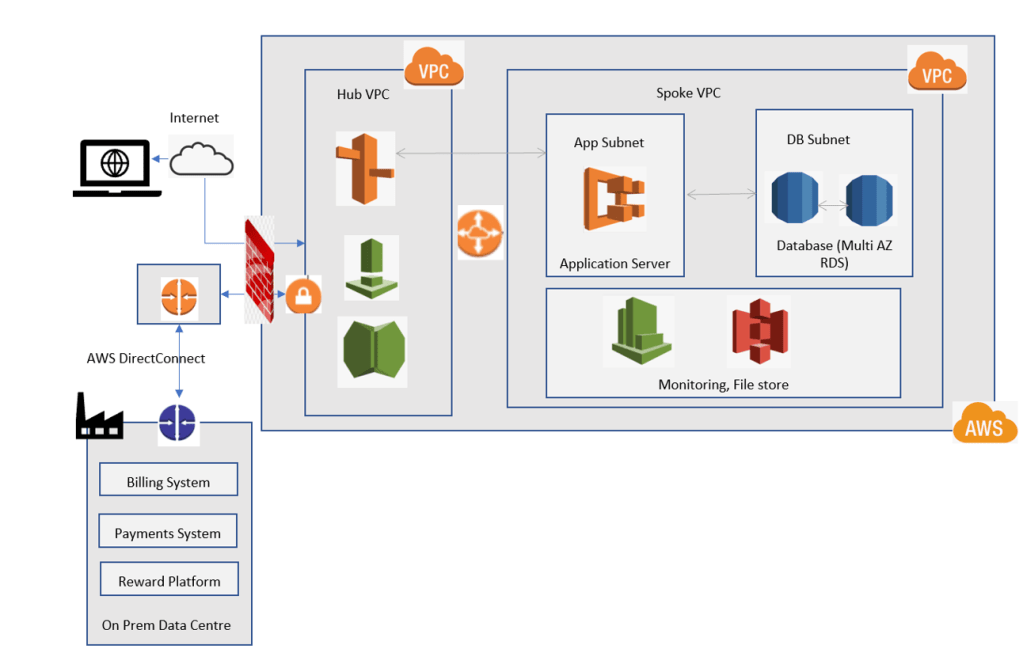
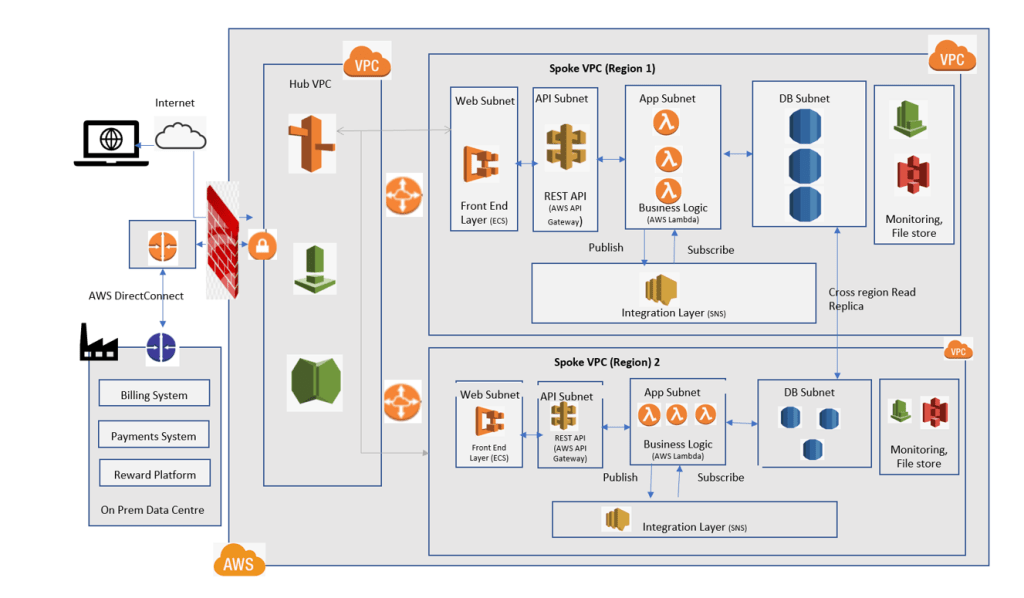
The customer portal is a 2-tier app with front-end built in Java Servlets and JSP with back end as Oracle database, the app integrates with Billing app using IBM MQ, Reward Platform over SOAP service and Payment System using Java RMI. Below is the logical representation of the architecture-

Fig 1- Current Architecture

solution

  1. Immediate Goal: Refactor to adapt to cloud native architecture: Moderate code change effort- The step 1 is to refactor the app to host in AWS using its native services.
    1. Front End Layer– The front end of the app will be containerized to be hosted on AWS ECS. Using ECS, that is a fully managed container service to deploy, manage and orchestrate the containerized apps, we modernize the app to a certain extent, also there is no need to manage the control plane or nodes per se, exploiting the benefit of cloud based managed services to the maximum.
    1. DB Layer– The Oracle database is hosted in AWS RDS instance. RDS is also a fully managed RDBMS service by AWS. AWS provides tools like AWS Data Migration Service to migrate the data in real time to RDS. RDS is setup with Multi AZ deployment for HA and cross region Read replica for DR.

Fig 2- Step 1: Refactor

2. End Goal: Modernise the app to microservice based architecture: Significant code change effort- The end state is to refactor and modernize the monolithic architecture to serverless microservice based architecture.

  1. Front End Layer– The front end of the app will be containerized to be hosted on AWS ECS.
    • REST Layer– The REST layer will host a REST API that is deployed on a AWS API Gateway, which is a serverless component from AWS that acts as a front door for the app.
    • Business Logic Layer– This layer contains actual busines logic. The single large monolith service will be broken into smaller, relatively logically independent, services like User Management Service, Payment Service, Monitor Usage service and will be written and deployed using AWS Lambda, those are also serverless components that allows to write and run code without the hassle of provisioning or managing the infrastructure.
    • Integration Layer– This is a pub/sub event-based integration layer implemented using AWS Simple Notification Service (SNS), that provides topics for high throughput, push based many to many messaging-based event-driven architecture. The layer will be used to maintain the consistency among the databases related to different services. The service will perform a task and publish an event to SNS with the required data and the subscribers (other services) will get triggered and take action according to the event and update the corresponding data in the database.
    • DB Layer– The Oracle database is hosted in AWS RDS instance. RDS is also a fully managed RDBMS service by AWS. AWS provides tools like AWS Data Migration Service to migrate the data in real time to RDS. Each service will have its own database, thus improving the overall performance. The RDS will be setup for Multi AZ deployment for HA and cross region Read replica for DR.
Fig 3- Step 2: Re-architect (Modernise the stack)
  • Future Enhancements- Global Road-map- With ABC Inc. having global aspirations, the solution can be hosted as a multi-region solution, the AWS Route 53 will use — based routing to route the request nearest available region to the end customer, hence providing the consistent user experience across the globe.
Fig 4- Future Global Enhancement

Conclusion

As we see here, the journey to cloud program for the customer portal for ABC Inc is carried out in 2 steps-

  • Refactor the app to move to AWS native architecture
  • Modernize the app to microservice based architecture with the ability for further extension to fulfil its global aspirations.

Azure: Managed Identity

A common problem for the developers while working for cloud based solutions, is to manage the credentials needed to connect to various services. Using Managed Identity, the need to store the credentials is eliminated. Using Managed Identities, Microsoft provides the mechanism to connect to the services that uses Azure Active Directory based authentication. Managed identities can be used to get the AD token to authenticate the request.

Types Of Managed Identities

There are two types of managed identities-

  1. System Assigned Managed Identity– This allows to create a managed identity in Azure AD tied to service for which the ID is created. The lifecycle of this ID is directly dependent on the same of the service. If the service is deleted the System Assigned Managed ID is also deleted.
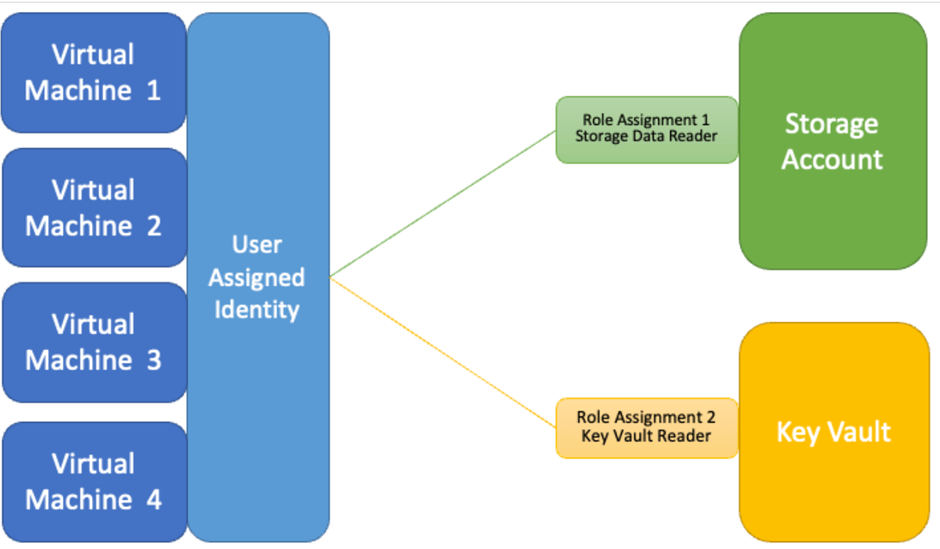
  2. User Assigned Managed Identity– This allows the user to create a managed identity as an independent resource. We can create a Managed ID and assign it to one or more resources in Azure.

How it works

Essentially, the managed identities are Service Principal of special type internally. These can only be used with the Azure resources. When the managed ID is deleted, the internal SP is also removed automatically. Also when Managed Identity is created, the Managed Identity Resource Provides issues an internal certificate to that ID.

The following diagram shows the flow while accessing a Azure SQL DB from Azure Web App using Managed Identity:

Accessing Azure SQL DB from Azure Web App Using Managed Identity

System Assigned vs User Assigned Managed Identities

User assigned managed IDs are more efficient in various ways-

  1. They are decoupled from the resource to which they are assigned.
  2. They can be used with multiple resources.
  3. User assigned managed IDs can be created and managed in advance.
  4. If there is need that each resource should have its own ID with the need to get this ID deleted with the resource, you should go with System Assigned Managed Identity.
System Assigned Managed Identity
User Assigned Managed Identity

REFERENCES

Predictive Maintenance in Manufacturing using Azure Serverless Architecture

Top 5 challenges in front of manufacturing industry

In today’s world, to remain competitive in manufacturing, the manufacturers have to shift production to the higher values, advanced technology support and to offer new product-as-a-service model. As per a Forbes report by 2020, 47% of all the products will be smart, connected and capable of providing product-as-a-service.

But there are pain areas as well that manufacturing industry has to face, below are some of the struggles the industry has faced in recent times,

  • Shortage of Skilled Labor: As the industry is expecting technology fueled growth post Covid, when economies will start to rebound, as per an estimate there will be approx. 4.6 mn jobs will be available over the next decade while 2.4 mn will go unfulfilled.
  • Intelligence from Machine: Automation, IoT, Robotics- with the increasing trend of technology in the industry, there us lot of data coming from the machines. The need of the hour is to analyze this data using Data Analytics and Machine Learning to help management to take better decisions.  
  • Maintenance: Every single day, manufacturing industry experiences breakdown and downtime, that impact significantly on the company growth. One of the true benefit of IoT, to analyze the historical data and predict the requirement of maintenance for a machine or equipment.
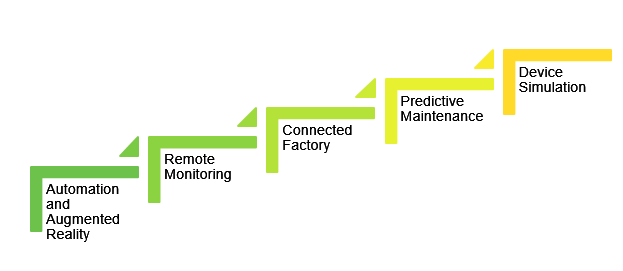
  • System Usability: Another big issue in the manufacturing industry is usability of the machines and equipment, with device simulation the workforce can be trained using the technology as a savior for the industry.
Technology to help manufacturing industry

Predictive Maintenance:

By default, most businesses rely on corrective maintenance. Parts are replaced as and when they fail, this causes factory to shut down that impacts the products manufacturing, thus the unhappy customers. At the next level, businesses practice preventive maintenance, where they determine the useful lifespan for a part, and maintain or replace it before a failure, this may lead to unnecessary maintenance of machines or equipment that was not still required, thus wastage of money.

Predictive Maintenance is to optimize the balance between corrective and preventative maintenance, by enabling just in time replacement of components.

 Predictive Maintenance Benefits:

  • This approach only replaces those components when they are close to a failure
  • Cost savings and competitive advantages to business.
  • End-to-End solution for a business scenario that predicts the point at which a failure is likely to occur
  • Proactively optimizes maintenance and create automatic alerts and actions for remote diagnostics and maintenance requests.

Predictive Maintenance using Azure Serverless components: Reference Architecture

Predictive Maintenance on Azure: Reference Architecture

Devices: Devices can be connected to the cloud directly or indirectly. Directly, using IP-capable devices that can establish secure connections via the internet. Indirectly, devices connect via a field gateway. This enables aggregation and reduction of raw device data before transport to the backend, and local decision-making capability on the edge.

IoT Hub: Azure IoT Hub offers built-in high-scale secure connectivity, data and event ingestion, and bi-directional communication with devices including device management with command and control capabilities. Azure IoT Hub can securely and performantly connect millions of devices to the cloud, from a variety of devices and protocols.

Stream Analytics: For the large amount of the data that is being generated by the field devices on real time, to process these live stream of data and complex rules associated with them, Azure Stream Analytics is used.

Event Hub: The stream analytics generates event and sends it to the Event Hub, which triggers background jobs for further analysis.

Event Processor: Web Job is used to process the event data that is being received from Event Hub, to apply the Machine Learning algorithms, a portion of this data is used to train the ML model as well.

Storage: It can be divided into warm path and cold path stores. Warm path data is required to be available for reporting and visualization immediately from devices. Cold path data is stored for a longer term, and used for batch processing. We use Azure Cosmos DB for warm path storage and Azure Blob Storage for cold storage.

Dashboard and UI- Web App or Power BI can be used to create and show the dashboard to the end user that will be used by the end users to browse the data in the interactive manner like charts etc.

Machine Learning: It enables systems to learn from historical data and experiences and to act without being explicitly programmed. Scenarios such as predictive maintenance are enabled through ML. We use Azure Machine Learning for ML needs.

References:

https://www.forbes.com/sites/louiscolumbus/2018/06/24/predicting-the-future-of-digital-manufacturing-2018/#1e26fc487c9b

https://www.machinemetrics.com/blog/the-impact-of-predictive-maintenance-on-manufacturing

https://azure.microsoft.com/en-in/industries/discrete-manufacturing/usecases/

Microservices- Usage of CQRS

CQRS (Command Query Responsibility Segregation), is all about using separate operations for different responsibilities like Update and Read. It helps in enhancing the performance, scalability and security of the overall architecture.

In this blog we’ll discuss couple of real time problems and corresponding solutions to those problems using CQRS. Also considerations while implementing CQRS to your solution.

Problem –

While working with traditional CRUD application, you can face some challenges that will eventually adversely impact the performance of the application and thereby a bad user experience, some of these are-

  • Difference in read and write representations of the data like the object may contain a column that is not even required.
  • It risks data contention when records are locked in the data store
  • It can make managing security and permissions more complex
  • Negative effect on performance due to load on the data store and data access layerCQRS-1

Solution-

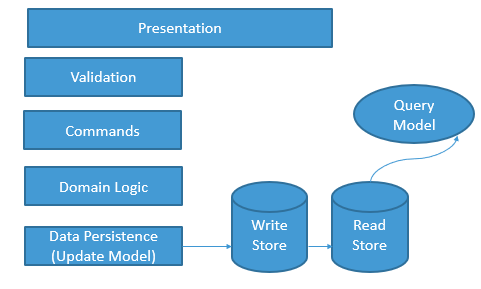
CQRS comes to the rescue. Where you can segregate the responsibility of Command (Update) and Query (Read) to separate models, repository, schema. You can implement the CQRS for above problem in following way-

  • Separate “query model” for reading data and the “update model” for writing data.
  • The read store can be a read-only replica of the write store or completely different schema
  •  Using multiple read-only replicas can greatly increase query performance

CQRS-2

Problem –

In Microservice architecture, there are several issues/challenges that we face. When you are working in distributed architecture, you are bound to face challenges. Some of them are as follows-

  • No longer straightforward to join the queries
  • The data is not easily queried
  • Consistency across the databases is no longer easy to maintain

Solution-

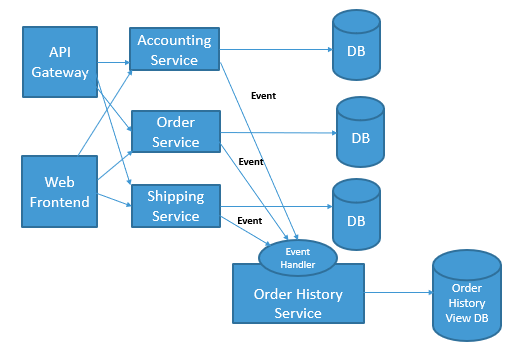
In Microservice architecture

  • Define a view database, which is a read-only replica or completely different schema.
  • The application keeps the secondary up to data by subscribing to Domain events published by the service that owns the data.CQRS-3Issues and Considerations
    • It may add complexity in terms of resiliency and eventual consistency
    • There is a risk of potential code duplication
    • Consider applying CQRS to limited sections of your system
    • A typical approach to deploying eventual consistency is to use event sourcing in conjunction with CQRS

Serverless Architecture- Benefits and Drawbacks

Serverless compute solution can be thought of Function-as-a-service or a microservice hosted on the cloud. By using severless compute you don’t have to think of infrastructure to host the app or scaling it out. The app is automatically scaled out based on the load. In today’s competitive world it is of utmost importance to save on cost, careful use of Serverless Compute may result on big saving at the infrastructure front. There are various ways to implement severless architecture AWS Lambda, Azure function, Azure Logic Apps are some of the services provided by these majors.

serverless architecture

Benefits of Serverless Compute-

Server less compute is a great offering which allows to host your business logic in cloud. These offerings provide you ways to write the business logic in the language of your choice. You are charged based on the usage. There are certain more benefits of Severless Architecture as follows-

Avoids over-allocation of the infrastructure

If you are using servers/VMs to host your app, then you will over allocate the infrastructure to handle the peak load time, this over allocated infrastructure won’t be utilized during the normal load time. Seveverless Architecture delegates this responsibility to the cloud vendor where the app is scaled out based on the load automatically.

Stateless

These instances are stateless in nature; the instances are created and destroyed on demand. If state is required, it can be stored in the storage.

Event Driven

It is even driven in nature. Severless components like Azure Functions can be invoked via triggers (response to events) called input triggers like receiving an HTTP request, adding a message to a queue etc. There is no need to write code to handle these events rather developer need to focus on the logic.


Drawbacks of Serverless Compute

Execution Time

If your app is bound to run for longer duration of time then serverless components like Azure Function are not meant for you. It would be better to host it in VM. The components like Azure Functions are better suited for quickly completing a task and exit. The duration can be increased to maximum 10 minutes for Azure Functions which is 5 minutes by default . If your logic takes more than that it is better to switch to hosting your app to VM.

Execution Frequency

If you expect your function (Azure Function) to run continuously then it will end up to cost more due to the consumption of the resources, it would be then cheaper to host your app on VM.