Deploying Small Language Models on AWS Inferentia

Small Language Models (SLMs) like Qwen have been gaining traction. They are efficient alternatives to larger language models. They offer good performance with reduced computational requirements. In this blog, I’ll guide you through the process of hosting a Qwen model on Amazon SageMaker’s cost-effective Inferentia instances. These instances are purpose-built for machine learning inference.

Why Amazon Inferentia for SLM Hosting?

Amazon Inferentia is AWS’s custom-designed chip specifically for accelerating machine learning inference workloads. When deploying SLMs like Qwen, Inferentia instances provide several key advantages:

  1. Cost-effectiveness: Inferentia instances can reduce inference costs by up to 50% compared to equivalent GPU-based instances
  2. Optimized performance: These instances are designed specifically for ML inference, delivering high throughput at low latency
  3. Seamless integration with SageMaker: You can leverage SageMaker’s comprehensive ML deployment capabilities

Preparing Your Qwen Model for Inferentia

Before deploying to Inferentia instances, you’ll need to optimize your Qwen model for this specific hardware. SageMaker provides optimization tools that can significantly improve performance:

Step 1: Model Optimization

Amazon SageMaker’s inference optimization toolkit offers significant benefits. It delivers up to 2x higher throughput. It also reduces costs by up to 50% for models like Qwen. Here’s how to optimize your model:

import boto3

import sagemaker

from sagemaker import get_execution_role

role = get_execution_role()

sagemaker_client = boto3.client('sagemaker')

# Create an optimization job

optimization_job_name = 'qwen-inferentia-optimization'

response = sagemaker_client.create_optimization_job(

    OptimizationJobName=optimization_job_name,

    RoleArn=role,

    ModelSource={

        'S3': {

            'S3Uri': 's3://your-bucket/qwen-model/model.tar.gz',

        }

    },

    DeploymentInstanceType='ml.inf2.xlarge',

    OptimizationConfigs=[

        {

            'ModelCompilationConfig': {

                'Image': 'aws-dlc-container-uri'

            }

        }

    ],

    OutputConfig={

        'S3OutputLocation': 's3://your-bucket/qwen-optimized/'

    },

    StoppingCondition={

        'MaxRuntimeInSeconds': 3600

    }

)

Deploying the Optimized Model to Inferentia

Once your model is optimized, you can deploy it to an Inferentia instance:

Step 2: Create a SageMaker Model

 model_name = 'qwen-inferentia-model'

sagemaker_client.create_model(

    ModelName=model_name,

    PrimaryContainer={

        'Image': 'aws-inference-container-uri',

        'ModelDataUrl': 's3://your-bucket/qwen-optimized/model.tar.gz',

    },

    ExecutionRoleArn=role

)

Step 3: Create an Endpoint Configuration

endpoint_config_name = 'qwen-inferentia-config'

sagemaker_client.create_endpoint_config(

    EndpointConfigName=endpoint_config_name,

    ProductionVariants=[

        {

            'VariantName': 'default',

            'ModelName': model_name,

            'InstanceType': 'ml.inf2.xlarge',

            'InitialInstanceCount': 1

        }

    ]

)

Step 4: Create and Deploy the Endpoint


endpoint_name = 'qwen-inferentia-endpoint'

sagemaker_client.create_endpoint(

    EndpointName=endpoint_name,

    EndpointConfigName=endpoint_config_name

)

print('Endpoint is being created...')

Fine-Tuning Performance with Inference Components

For more granular control over resource allocation, you can use SageMaker inference components:

inference_component_name = 'qwen-inference-component'

sagemaker_client.create_inference_component(

    InferenceComponentName=inference_component_name,

    EndpointName=endpoint_name,

    Specification={

        'ModelName': model_name,

        'ComputeResourceRequirements': {

            'NumberOfAcceleratorDevicesRequired': 1,

            'NumberOfCpuCoresRequired': 4,

            'MinMemoryRequiredInMb': 8192

        }

    }

)

Testing the Deployed Model

You can now test your deployed Qwen model:


import boto3

import json

runtime = boto3.client('sagemaker-runtime')

payload = {"inputs": "What is Amazon SageMaker?"}

response = runtime.invoke_endpoint(

    EndpointName=endpoint_name,

    ContentType='application/json',

    Body=json.dumps(payload)

)

result = json.loads(response['Body'].read().decode())

print(result)

Performance Monitoring and Optimization

Once your Qwen model is deployed on Inferentia instances, continuously monitor its performance:

  1. Use SageMaker’s built-in metrics and logs for endpoints
  2. Conduct shadow testing to evaluate model performance against other variants
  3. Apply SageMaker’s autoscaling to handle fluctuations in inference requests

Conclusion

Hosting SLM models like Qwen on Amazon SageMaker Inferentia instances offers an excellent balance of performance and cost-effectiveness. By using SageMaker’s optimization toolkit, you can achieve significantly higher throughput. Inferentia hardware helps reduce costs compared to traditional GPU instances.

For high-traffic applications, consider implementing SageMaker’s multi-model endpoints or inference pipelines to further optimize resource utilization. Inferentia instances can deliver exceptional performance with proper optimization. These techniques are crucial for serving SLM models like Qwen in production environments.

Remember that model optimization techniques should be evaluated based on your specific needs. Test different configurations for your particular Qwen model. This will help you find the optimal balance between performance and cost.

Sources:

  1. MLSUS05-BP03 Optimize models for inference – Machine Learning Lens
  2. Machine Learning Inference – Amazon SageMaker Model Deployment – AWS

Customizing Foundation Models: A Guide to Fine-Tuning

In today’s rapidly evolving artificial intelligence landscape, foundation models have revolutionized what’s possible with machine learning. These powerful, pre-trained models serve as the backbone for countless applications across industries. However, to truly unlock their potential for specific business needs, customization is often necessary. Let me walk you through the key approaches to fine-tuning foundation models for your specific use cases.

Understanding Foundation Models and the Need for Customization

Foundation models are extremely powerful models trained on vast datasets that can solve a wide array of tasks. However, to achieve optimal results for specific business applications, some form of customization is typically required to align the model with your unique requirements.

Diagram illustrating the process of fine-tuning foundation models.

The Customization Spectrum: From Prompt Engineering to Fine-Tuning

When customizing foundation models, it’s best to start with simpler approaches before moving to more complex ones:

1. Prompt Engineering

As we discussed in our previous blog, the recommended first step in customization is prompt engineering. By providing well-crafted, context-rich prompts, you can often achieve desired results without any model weight modifications. This approach is cost-effective and requires no additional training infrastructure.

2. Fine-tuning Foundation Models

If prompt engineering doesn’t yield satisfactory results, fine-tuning becomes the next logical step. Fine-tuning involves further training a pre-trained model on domain-specific data to adapt it to your particular use case.

Types of Fine-Tuning Approaches

Domain Adaptation

This approach involves training the model on data specific to your domain or industry. It helps the model learn the vocabulary, concepts, and patterns relevant to your field.

Instruction-based Fine-Tuning

This technique focuses on teaching the model to follow specific instructions or perform particular tasks by training it on examples of instructions paired with desired outputs.

Fine-Tuning with AWS Services

Amazon SageMaker provides comprehensive support for fine-tuning foundation models:

Using SageMaker Unified Studio

SageMaker Unified Studio offers a collection of foundation models for various use cases, including content writing, code generation, and question answering. Models like Meta Llama 4 Maverick 17B and Stable Diffusion 3.5 Large can be fine-tuned through this platform.

The fine-tuning process involves:

  1. Signing in to Amazon SageMaker Unified Studio
  2. Selecting a model to train
  3. Creating a training job from the model details page
  4. Either using the default training dataset or providing a custom dataset URI
  5. Optionally updating hyperparameters and specifying training instance types
  6. Submitting the training job

Low-Rank Adaptation (LoRA)

LoRA is a cost-effective fine-tuning technique offered through SageMaker AI. It works on the principle that only a small part of a large foundation model needs updating to adapt it to new tasks or domains. A LoRA adapter augments the inference from a base foundation model with just a few extra adapter layers, making it more efficient than full model fine-tuning.

Fine-tuning Models with Amazon Bedrock

Amazon Bedrock offers powerful capabilities to fine-tune foundation models for your specific business needs. Here’s a comprehensive guide on how to use Bedrock for model fine-tuning:

Using Amazon Bedrock

Amazon Bedrock supports two main customization methods:

  1. Fine-tuning: This involves providing labeled data to train a model on specific tasks. The model learns to associate certain types of outputs with specific inputs, with parameters adjusted accordingly. Fine-tuning is ideal when you need high accuracy for domain-specific tasks.
  2. Continued pre-training: This method uses unlabeled data to familiarize the model with specific domains or topics. It’s useful when working with proprietary data not publicly available for training.

Supported Models for Fine-tuning
Currently, fine-tuning is available for several models including:

  • Command
  • Llama 2
  • Amazon Titan Text Lite and Express
  • Amazon Titan Image Generator
  • Amazon Titan Multimodal Embeddings models

Commonly Used Hyperparameters for Fine-Tuning

When fine-tuning foundation models, you can customize various hyperparameters:

  • Epoch: The number of complete passes through the training dataset
  • Learning rate: Controls how much to change the model in response to estimated errors
  • Batch size parameters: Controls how many samples are processed before updating model weights
  • Max input length: Defines the maximum length of input sequences
  • LoRA parameters: For adapting specific parts of the model efficiently

Evaluating Fine-tuned Models

To assess the effectiveness of your fine-tuned model, consider metrics such as:

  • BERTScore: Evaluates semantic similarity between generated and reference texts
  • Inference latency: Measures the response time of the model
  • Cost analysis: Evaluates the financial implications of using the model

Choosing the Right Approach: RAG, Fine-tuning, or Hybrid

When customizing models, consider these approaches:

  1. Retrieval-Augmented Generation (RAG): Connects models to external knowledge sources, enhancing responses without modifying the model.
  2. Fine-tuning: Adjusts model parameters using labeled data for your specific task.
  3. Hybrid Approach: Combines RAG and fine-tuning for highly accurate, context-aware responses.

The choice depends on your specific needs, available data, and resources. For example, if you have limited labeled data but extensive knowledge bases, RAG might be more appropriate. If you have substantial domain-specific data and require high customization, fine-tuning could be better.

Conclusion

Fine-tuning foundation models allows organizations to leverage the power of general-purpose AI while tailoring it to their specific requirements. By following a systematic approach—starting with prompt engineering and progressing to more sophisticated fine-tuning techniques when needed—you can create customized models that deliver superior performance for your use cases.

Whether you’re improving accuracy, reducing latency, or enabling domain-specific capabilities, the customization options available through AWS services like SageMaker provide the flexibility and power needed to transform foundation models into purpose-built solutions for your business needs.

Sources:

  1. Get started fine-tuning foundation models in Amazon SageMaker Unified Studio
  2. Foundation models and hyperparameters for fine-tuning
  3. Fine-tune models with adapter inference components
  4. Foundation model customization
  5. Tailoring foundation models for your business needs: A comprehensive guide to RAG, fine-tuning, and hybrid approaches

Understanding Generative AI: Benefits and Applications

Generative AI represents one of the most transformative technological developments of our time. Unlike traditional AI systems that analyze or classify existing data, generative AI creates new content that never existed before. This new content ranges from text and images to music and code.

What is Generative AI?

Generative AI refers to artificial intelligence systems. These systems are designed to produce content based on patterns learned from vast amounts of training data. These systems use sophisticated neural network architectures, particularly transformer models, to understand the underlying structure and relationships within data.

The technology works by predicting what comes next in a sequence. This could be the next word in a sentence, a pixel in an image, or a note in a musical composition. Through extensive training on diverse datasets, these models develop a nuanced understanding of language, visual concepts, or other patterns.

Foundation Models (FMs) and Their Differences from Traditional Models

Foundation models (FMs) are large pre-trained models that serve as a starting point for developing more specialized AI applications. They represent a significant evolution in machine learning architecture and capabilities.

What are Foundation Models?

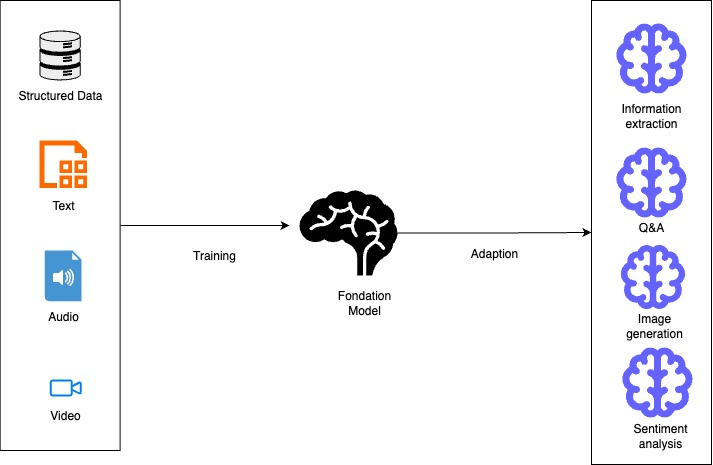
Foundation models are large-scale AI models that have been trained on massive datasets, often containing text, images, or other modalities. These models learn general patterns and representations from this data. This allows them to be adaptable to many downstream tasks without requiring complete retraining.

A foundation model is “a large pre-trained model.” It is adaptable to many downstream tasks. It often serves as the starting point for developing more specialized models. Examples include models like Llama-3-70b, BLOOM 176B, Claude, and GPT variants.

A diagram illustrating the process of training and adapting a foundation model, showcasing inputs like structured data, text, audio, and video, and outputs including information extraction, question answering, image generation, and sentiment analysis.
Diagram 1- Diagram showcasing the training and adaptation process of foundation models

Key Differences from Traditional Models

1. Training Approach

  • Foundation Models: These are pre-trained on vast, diverse datasets. They use a self-supervised or semi-supervised manner. This method allows them to learn patterns and representations without explicit labels for specific tasks.
  • Traditional Models: Typically trained from scratch for specific tasks using labeled datasets designed for those particular applications.

2. Scale and Architecture

  • Foundation Models: Enormous in size, often with billions or trillions of parameters. For example, Claude 3 Opus and Llama-3-70B have tens or hundreds of billions of parameters.
  • Traditional Models: Generally much smaller. They have parameters ranging from thousands to millions. These models are designed with specific architectures. They are optimized for particular tasks.

3. Adaptability and Transfer

  • Foundation Models: Can be adapted to multiple downstream tasks through fine-tuning, prompt engineering, or few-shot learning with minimal additional training.
  • Traditional Models: Built for specific applications and typically require complete retraining to be applied to new tasks.

4. Resource Requirements

  • Foundation Models: Require significant computational resources for training and often for inference, though smaller variants are being developed.
  • Traditional Models: Can often run on less powerful hardware, making them more accessible for deployment in resource-constrained environments.

5. Data Requirements

  • Foundation Models: Require massive datasets for pre-training but can then generalize to new tasks with relatively little task-specific data.
  • Traditional Models: Require substantial task-specific labeled data to achieve good performance.

6. Capabilities

  • Foundation Models: They can generate human-like text. They understand context across long sequences. They create images from text descriptions. They also demonstrate emergent abilities not explicitly trained for.
  • Traditional Models: Usually perform a single task or related set of tasks. Their capabilities are limited to what they were explicitly trained to do.

Foundation Models in AWS

AWS offers foundation models through services like:

  1. Amazon Bedrock: A fully managed service providing access to foundation models from providers like Anthropic, Cohere, AI21 Labs, Meta, and Amazon’s own Titan models.
  2. Amazon SageMaker JumpStart: Offers a broad range of foundation models that can be easily deployed and fine-tuned, including publicly available models and proprietary options.

Foundation models in these services can be used for various generative AI applications including content writing, code generation, question answering, summarization, classification, and image creation.

Amazon Bedrock

Amazon Bedrock is a fully managed service. It offers a simple way to build and scale generative AI applications. These applications use foundation models (FMs). Here’s how you can leverage it:

  1. Access to Multiple Foundation Models

Amazon Bedrock offers unified API access to various high-performing foundation models. These models come from leading AI companies such as Anthropic, Cohere, Meta, Mistral AI, AI21 Labs, Stability AI, and Amazon. This allows you to experiment with different models and choose the best one for your specific use case without committing to a single provider.

  1. Building Applications

You can build applications using the AWS SDK for Python (Boto3) to programmatically interact with foundation models. This involves setting up the Boto3 client, defining the model ID, preparing your input prompt, creating a request payload, and invoking the Amazon Bedrock model.

  1. Key Features and Capabilities
    • Model Customization: Fine-tune models with your data for specific use cases
    • Retrieval Augmented Generation (RAG): Enhance model responses by retrieving relevant information from your proprietary data sources
    • Agent Creation: Build autonomous agents that can perform complex tasks using the AWS CLI or CloudFormation
    • Knowledge Bases: Query your data and generate AI-powered responses using the retrieve-and-generate functionality
    • Guardrails: Implement safeguards based on your use cases and responsible AI policies
  2. Security and Privacy

Bedrock provides robust security features, including data protection measures that don’t store or log user prompts and completions. You can encrypt guardrails with customer managed keys and restrict access with least privilege IAM permissions.

  1. Deployment Options
    • On-demand: Pay-as-you-go model invocation
    • Cross-Region inference: Enhance availability and throughput across multiple regions
    • Provisioned throughput: Reserve dedicated capacity for consistent performance
  2. Integration with AWS Ecosystem

Amazon Bedrock seamlessly integrates with other AWS services, making it easy to build comprehensive AI solutions. You can use SageMaker ML features for testing different models and managing foundation models at scale.

By leveraging Amazon Bedrock, you can quickly build and deploy generative AI applications. You can maintain security, privacy, and responsible AI practices. All this is achieved without having to manage complex infrastructure.

The Future Landscape

Generative AI will continue evolving rapidly, with improvements in reasoning ability, multimodal capabilities, and specialized domain expertise. Organizations that thoughtfully integrate these technologies will likely gain significant competitive advantages in efficiency, creativity, and problem-solving.

Key Applications of Generative AI

Generative AI is already transforming numerous fields:

  • Content Creation: Generating articles, marketing copy, and creative writing
  • Visual Arts: Creating images, artwork, and designs from text descriptions
  • Software Development: Assisting with code generation and debugging
  • Customer Service: Powering intelligent virtual assistants and chatbots
  • Healthcare: Aiding in drug discovery and personalized treatment plans
  • Manufacturing: Optimizing product design and production processes

References:

  1. Build generative AI applications on Amazon Bedrock with the AWS SDK for Python (Boto3)
  2. Generative AI for the AWS SRA
  3. Build generative AI solutions with Amazon Bedrock
  4. Choosing a generative AI service
  5. Amazon Bedrock or Amazon SageMaker AI?
  6. Amazon SageMaker JumpStart Foundation Models
  7. Amazon Bedrock or Amazon SageMaker AI?
  8. Amazon Bedrock Models