Benefits and Challenges of cloud migration

In today’s world when the IT industry is moving away from the big on-premise datacenters to cloud based datacenters and serverless architecture. There might be scenarios where you need to convince some potential client about the benefits from such migration.

If there are some companies that are planning their first on-premise to cloud movement, it is important to discuss with them the benefits of the cloud along with the associated challenges-

Below are the benefits from the migration-

  • The business of the company would be on rise, this will raise the demand of additional infrastructure to accommodate the additional load, the cloud migration gives the flexibility of auto-scaling and no need to reserve the hardware in advance to meet such requirement.
  • Over the time the storage requirements can grow exponentially, it would be very costly to meet such need in the on-premise data centers, the cloud vendors provide the storage on demand that is highly available, durable and reliable.
  • The data-center security, physical as well as data, is another costly affair to deal with in the case of on-premise, when moving to cloud this is handled by the cloud vendor; we as the application owners are responsible for securing our resources.
  • Moving to cloud will result in the saving of operational cost.
  • While creating a DR plan, the target architecture can double the on-premise infrastructure cost with regional redundancy extremely expansive to achieve; the Cloud movement would provide to achieve this very effectively.
  • The DevOps capabilities of the Cloud vendors will provide the flexibility the focus on development with the level of automation provided.
  • It makes life of operation team becomes a lot easier due to automation, monitoring etc. capabilities provided by the cloud vendors.


Below are associated risks/challenges-


  • If the business is running as expected for decades with saturation already achieved; all the SLAs are being met, everything is in control; then no need to disturb this beautiful calmness.
  • There might be some legacy apps those have very strict dependency (hardware/OS) and can’t be moved to cloud.
  • The app can’t be moved without re-architecting/refactoring due to some dependencies.
  • There might be some compliance challenges or some sensitive data that can’t be moved outside the boundary of the premise.
  • There might be some latency experienced when app is accessed over internet when compared to access from in-house LAN.

CONTAINERIZATION & PATH TO CLOUD FOR EXISTING .NET APPLICATIONS

Containerization: A Step Beyond Virtualization

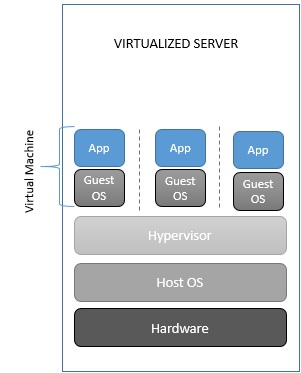
Virtualization is decades old approach to maximize hardware resources by putting apps into Virtual Machines that have their own Operating System, running on the server’s operating system independently. Virtualization can be very cost effective due to consolidation. You can host multiple apps on a host thru these VMs, thus maximum utilizing the power of underlying server by maximizing app-to-machine ratio.

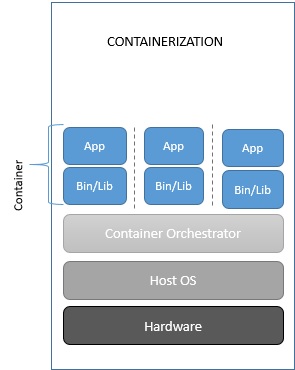
Containerization is designed to solve the problem of application management. Though it has similar benefits but it is not a replacement to Virtualization. Containerization is application specific, providing platform to apps to run on. You can deploy and run this container anywhere without needing an entire VM to run the app.

The Concept Behind

Containerization basically virtualizes the operating system so that the applications can be distributed along the single host without requiring any VM for them. It does this by sharing the OS kernel among the apps, that is the core module of an Operating System. All Apps running on a single machine will share the same kernel.

image1.jpgimage2

Benefits of containerization

The key benefit of the containerization is to make it run anywhere. Containerization makes applications portable by virtualizing at the OS level, creating isolated, kernel based, encapsulated system.

Apart from portability, the other benefit is, it requires far a few resources. For instance- you can run a lot of containers without consuming too much of space, as you are sharing the OS.

Below are some of the key benefits-

  • Sharing a kernel means you can put more applications on a single server. Containerization removes the OS layer, instead sharing the same kernel with the host and other apps makes the containers much smaller in size. So, you can run lot more containers on a single machine.


  • Sharing also enables containerized apps to launch faster than a virtual machine. Because they are running on the same kernel, containers are already booted up, makes them to launch much faster than the Virtual Machines that require to boot up its own OS on launch.
  • Supports a more unified DevOps culture. Containers deployment can be automated and integrated with the CI/CD pipelines using the tools like Jenkins/VSTS, making it faster to reach the market.

Things to remember while containerizing

Before we even talk about the road to containerization, though, we should first consider whether you should containerize in the first place. Below are the points/questions we should remember/ask before strategizing the containerization-

  • Service/App should be stateless.
  • An app being containerized shouldn’t contain any environment config.
  • Containers are meant to house a single process. For example, you wouldn’t want to include your app tier and your web tier in the same container.
  • You should be aiming to promote a single build-up through environments instead of generating a build per environment.
  • Is the App Pre-Packaged as a Single Binary or JAR File?
  • Is the Platform on Which Your App Is Built Available in a Containerized Version or Package Yet?
  • Are Any of Your Third-Party Apps Available in a Container Version Yet?
  • Is Your Application Already Part of Continuous Integration/Continuous Deployment Pipeline?


Path To Cloud For Existing .Net Applications

Now since we have discussed enough about the containerization, we’ll discuss how can we move to cloud (Azure to be specific) the existing .Net applications, that may eventually need to containerize these apps.

Organizations typically choose to move to the cloud for the agility and speed they can get for their applications. You can set up thousands of servers (VMs) in the cloud in minutes, compared to the weeks it typically takes to set up on-premises servers.

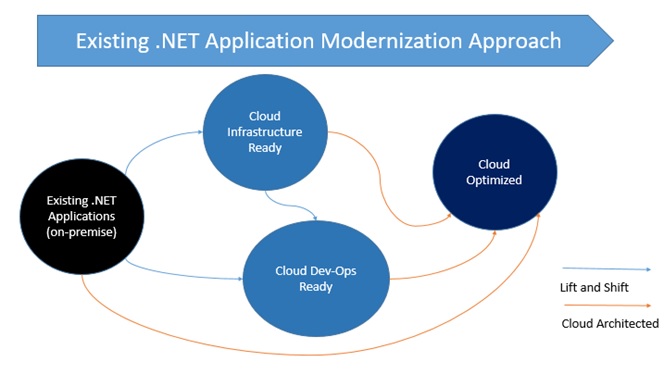
There is not a single-fit-to-all strategy available while moving to cloud, it depends on priorities and the business needs of the organization. Not all applications need to move to PaaS model or Cloud Native development model at once. In most of the cases you need to move to cloud maturity model in a phased manner.

image3

Each migration approach has different set of benefits, you can choose any one or components from multiple approaches as a hybrid approach, containing certain components from on premise and rest from cloud.

Below are different levels of maturity to move to cloud-

  • Level 1- Cloud Infrastructure-Ready: In this migration approach, you simply re-host or move your application to an Infrastructure-As-A-Service platform provided by the cloud provider. Your apps remain same code and architecture wise, just you move them to VM on the cloud.
  • Level 2Cloud DevOps Ready: At this level, after initial lift-and-shift, you can gain more advantages of the cloud without re-architecting and re-coding. You improve the agility of the apps to ship faster by better implementing the DevOps in your application lifecycle. You can do so by using Windows Containers, that uses Docker Engine and integrate it with the CI/CD pipeline, you can also take benefit by using more cloud managed services related to data, monitoring etc.
  • Level 3Cloud-Optimized: This maturity model is the end goal and driven by business need of your organization. In this model, you take advantage of PaaS platform of the cloud. You write Cloud Native apps and Microservices architecture to evolve long term agility and to scale to new limits. New code must be written when you need to write cloud native apps or microservices. The benefits of this approach are difficult to achieve in Monolithic or on premise architecture.

Key Technologies And Architectures By Maturity Level

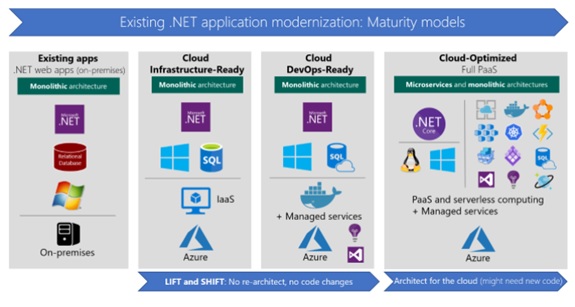
Most existing .NET applications might nowadays be based on .NET Framework 4.x, or even on .NET Framework 3.5, and use web frameworks like ASP.NET MVC, ASP.NET Web Forms, ASP.NET Web API, Windows Communication Foundation (WCF), ASP.NET SignalR, and ASP.NET Web Pages. These established .NET Framework technologies depend on Windows. That dependency is important to consider if you are simply migrating legacy apps and you want to make minimal changes to your application infrastructure.

image5

  • Cloud Infrastructure-Ready (Re-host or basic lift and shift): As a first step, many organizations want only to quickly execute a cloud-migration strategy. In this case, applications are simply rehosted to cloud using IaaS platform. Most rehosting can be automated by using Azure Migrate, a service that provides the guidance, insights, and mechanisms needed to assist you in migrating to Azure based on cloud tools like Azure Site Recovery and Azure Database Migration Service. You can also do the rehosting manually. For example, you can move your applications to VMs in Azure with very little modification-probably with only minor configuration changes. The networking in this case is similar to an on-premises environment, especially if you create virtual networks in Azure.
  • Cloud DevOps-Ready (improved lift and shift): This model is about making a few important deployment optimizations to gain some significant benefits from the cloud, without changing the core architecture of the application. The fundamental step here is to add Windows Containers support to your existing .NET Framework applications. This important step (containerization) doesn’t require touching the code, so the overall lift and shift effort is very light. Visual Studio automatically chooses smart defaults for ASP.NET applications and Windows Containers images. These tools offer both a rapid modification, and a fast path to get the containers to Azure. Your agility is improved when you deploy to multiple environments. Then, moving to production, you can deploy your Windows Containers to orchestrators like Azure Service Fabric or Azure Container Service (Kubernetes, DC/OS, or Swarm). During this initial modernization, you can also add assets from the cloud, such as monitoring with tools like Azure Application Insights; CI/CD pipelines for your app lifecycles with Visual Studio Team Services; and many more data resource services that are available in Azure. For instance, you can modify a monolithic web app that was originally developed by using traditional NET Web Forms or ASP.NET MVC, but now you deploy it by using Windows Containers. When you use Windows Containers, you should also migrate your data to a database in Azure SQL Database Managed Instance, all without changing the core architecture of your application.
  • Cloud-Optimized: As discussed earlier, the ultimate goal when you modernize applications in the cloud is basing your system on PaaS platforms like Azure App Service. PaaS platforms focus on modern web applications, and extend your apps with new services based on serverless computing and platforms like Azure Functions. The second and more advanced scenario in this maturity model is about microservices architectures and cloud-native applications, which typically use orchestrators like Azure Service Fabric or Azure Container Service (Kubernetes, DC/OS, or Swarm). These orchestrators are made specifically for microservices and multi-container applications. All these approaches (like microservices and PaaS) typically require you to write new code-code that is adapted to specific PaaS platforms, or code that aligns with specific architectures, like microservices.

image 4

When you decide to move to cloud you not necessarily move big bang. You don’t need to re-architect or re-code your application from day one, To optimize the cost-effectiveness of your organization’s cloud migration strategy, it’s important to consider the needs of your business and requirements of your apps. You’ll need to determine:


  • Which apps require a transformation or re-architecting.
  • Which apps need to be only partially modernized.
  • Which apps you can “lift and shift” directly to the cloud.


References

https://12factor.net/

https://codefresh.io/containers/things-consider-containerizing-app/

https://docs.microsoft.com/en-us/azure/service-fabric/service-fabric-quickstart-java-spring-boot

https://docs.microsoft.com/en-us/dotnet/standard/modernize-with-azure-and-containers/

https://www.upwork.com/hiring/development/what-is-containerization-and-is-it-the-right-solution-for-you/

NET-Microservices-Architecture-for-Containerized-NET-Applications-(Microsoft-eBook)

DevOps- DevOps on Azure and DevOps to NoOps

What is DevOps

DevOps is combination of culture, practice and automated tools that increase the organization’s ability to deliver the product and services at high pace. This increased pace enables the organization to better serve their customers and compete the market challenges.

Capture

Under a DevOps model, Development and Operations team no longer work in “silos”. Sometimes these two teams are merged into a single team where the team members work across the lifecycle of the project. Quality Assurance team may also become more tightly integrated with Development and Operations and help in delivering a high-quality product. Facilitating closer relationship between these working streams is an important part of culture shift. This will benefit the organization from their combined knowledge and experience and improve the job satisfaction as well.

The ultimate goal for adopting the DevOps is to- deploy the quality software automatically to deliver the business value fast.

“DevOps is the union of people, process and products to enable continuous delivery of value to our end users”- Donovan Brown

Why DevOps

The pace at which industry is moving, it is very critical for an organization that their products, features or services reach the customer fast. It is very important in today’s scenario that the teams are more involved in innovation rather that fixing or maintaining. By implementing DevOps, it becomes possible to deliver the new features to the customer quickly without the manual interventions.

Benefits of DevOps

Speed

speed

DevOps allows to deliver at high velocity to help you enable innovate for your customers fast, adapt to changing markets better and grow efficiently driving business results. DevOps enables your development and operations teams to achieve these results. Your teams will take responsibility of their features and quickly release that to the customers.

Rapid Delivery

Rapid

DevOps enables to deliver your product or features at rapid speed thus allowing ample time to innovate for your customer so you have competitive edge in the market. Any enhancement on the product can be delivered to the customer very rapidly hence the customer satisfaction is increased. Continuous Integration and Continuous Deployment are the processes that automate the entire release process.

Reliability

Reliablity


DevOps ensures the quality of the application update and the underlying infrastructure changes so that you can deliver high quality product at high pace, maintaining positive experience for the customers. Integration of quality gates in the release pipelines ensures the quality of the product, while integration of monitoring and logging informs about the performance aspects in the real time.

Scale

scable

DevOps helps to increase the scalability of the infrastructure and development process, the options like Infrastructure as a Code helps to maintain the various environments in a repeatable and more improved way.

Improved Collaboration

collaboration

DevOps help to improve collaboration among the teams. It helps to build much more efficient and effective team and mutual collaborating culture; hence it helps in reducing the time wastages and in efficiencies. Teams start to emphasize more on cultural values like ownership, mutual respect and responsibilities.

Security

security

DevOps enables the rapid delivery without compromising on the security front and still remain security compliance. One can opt the DevOps model by automating and integrating the security policies and compliance techniques.

DevOps on Azure

Microsoft Azure provides strong tool chain to support DevOps for the applications.  You can host any technology, any framework Node.JS, php, Python, Java etc. not just Microsoft technologies. You can integrate the release pipeline with git repository or Team Foundation Version Control (TFVC). The tool chain from Azure getting rich day by day with something new being release every three weeks.

Let’s demonstrate how can DevOps be implemented step by step on Azure.

Create a WebApp

A WebApp can host any web application in any technology/framework.

Capture1

Turn on the Application Insight

Application insight is a powerful way of monitoring the performance of your application in real time.

appinsight

Add Continuous Delivery

This will integration the build pipeline with release pipeline. This automates the build, load test and deployment. Setup deployment on staging environment, set up approvals before going on Production.
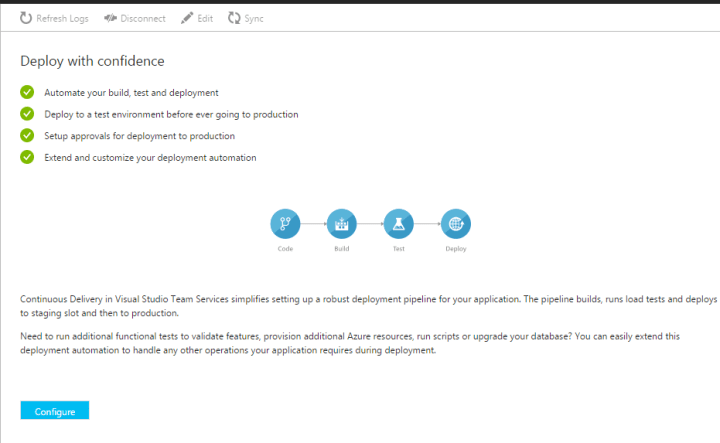
cont del.png

Select the repository

repo

Select the application framework

framework.png

Setup the load test

loadtest.png

Setup the deployment slot

Using the deployment slot, one can deploy to the staging environment to ensure the quality, once quality is checked to be at the required level, it can be swapped with Production so the end user experiences zero down time.

depslot.png

Now the Azure will automatically create build definition for you and create the automated release pipeline so each time you run the build job the environment will be auto updated after running the load test. You can also integrate it with the unit tests, so the unit tests are also run before the deployment. Microsoft also provides plug ins to integrate the build job with SONAR. So the entire build/release pipeline can be automated in Azure to implement fully automated DevOps cycle.

DevOps to NoOps

Let’s now discuss another paradigm called NoOps.

The NoOps is a concept of using intelligent automation for your operations so you can eliminate the need of humans to manage the operations, save precious engineering time and let the know problems solved by intelligent machines.

It is the concept that an IT environment can become so automated and abstracted from the underlying infrastructure that there is no need for a dedicated team to manage software in-house.

The tops trends that will power the NoOps adoption are as follows-

Serverless Programming

With the birth of concept of Function-as-a-Service by the providers like Amazon Lambda and Azure Functions industry has already started to move to the server less paradigm without thinking about the underlying infrastructure.

Containerization

The industry will see increased adoption for all the new application deployment in the cloud being powered by containers like Docker etc. As industry adopt cloud as mainstream infrastructure, it will see further increased trend of Containerization across enterprise applications in the companies.

Microservices Architecture

While lots of applications have already moved to Cloud, the real power of Cloud can only be realized by the use of Microservices. The microservice helps to decouple from the complexity of the Monolithic services. These are small, manageable and independently deployable units handling specific responsibilities. The microservices will see a rapid adoption with containerization becoming new way of deployment on the cloud.

Intelligent and Unified Operations

With the rise of machine intelligence and deep learning, there will be a deep rise in dynamic tooling like intelligent monitoring, intelligent deployment, intelligent APM, intelligent log management and intelligent incident management.