Modernizing legacy apps is an important aspect in running a successful business. AWS provides plethora of services to modernize and host your legacy .net apps. With AWS your modernization decisions can be based on your business needs rather than licensing or agreement. With AWS you can choose your legacy .Net apps to Rehost, Re-platofrm or Refactor/Rearchitect to AWS services.
Following are the various approaches to modernize the legacy apps. We are not discussing the reshot (Lift and Shift) approach in this blog rather we’ll be focussing on refactor and rearchitect approach.
Pathways of Modernisation:
- Re-platform/Refactor Front End Layer(Web Layer on ASP.Net) on Elastic Beanstalk
- The web layer can be hosted on Elastic Beanstalk. Elastic Beanstalk is a fully managed service to host web applications. Some of the use cases are as follows:
- Host Web Apps
- Host API services
- Host Web backends
- The web layer can be hosted on Elastic Beanstalk. Elastic Beanstalk is a fully managed service to host web applications. Some of the use cases are as follows:
- Refactor the Front End Layer(Web Layer on ASP.Net) on Elastic Container Service
- The web layer can also be containerized and hosted on ECS. ECS is a fully managed AWS container orchestration service that makes the management, deployment and scaling of the containerised apps easy. With ECS you can launch, monitor and scale your app across various platforms/compute options easily.
- Refactor/Rearchitect the Front End Layer(Web Layer on ASP.Net) on AWS App Runner
- AWS App Runner is the fully managed service by AWS that lets you build, deploy and run web app without having prior experience on containers or infrastructure. AWS App Runner builds and deploys web applications automatically, load balances traffic with encryption, scales to meet your traffic needs, and allows for the configuration of how services are accessed and communicate with other AWS applications in a private Amazon VPC
Modernize and deploy .Net App on AWS App Runner
In this section, we’ll host and deploy our .Net web app using AWS App Runner. The source code is stored in GitHub. We’ll enable auto deployment from GitHub so the app is deployed as soon as there is a change pushed to repo.
Step 1: Create a AWS App Runner service and select GitHub as source code repo, select the required repo from GitHub after making successful connection to GitHub

Step 2: Choose the run time (.Net 6) and specify the build and publish commands dotnet publish -c Release -o out and dotnet publish -c Release -o out
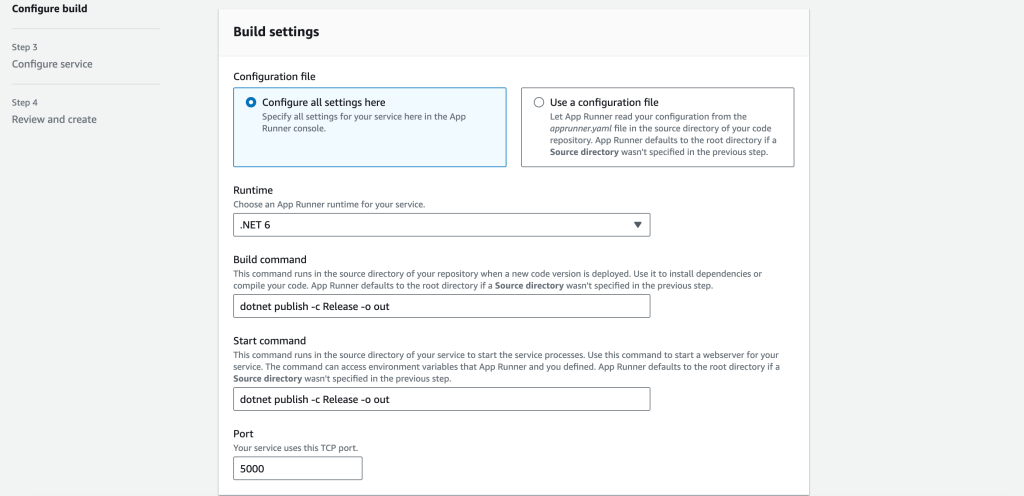
Step 3: Configure the service and specify the connection string (it must be stored in AWS Secret Manager)

Step 4: Provide the DB VPC by selecting custom VPC and creating VPC connector-

Step 6: Once published successfully, the web app can be accessed using the public URL-

Conclusion: In this blog, we have discussed what are some of the services provided by AWS to host and deploy the legacy .Net apps on AWS native services. We also discussed how AWS APP Runner can be used to host ASP.Net Web App and implementing Continuous Deployment from GitHub automatically.
 Alok's blog