Containerization: A Step Beyond Virtualization
Virtualization is decades old approach to maximize hardware resources by putting apps into Virtual Machines that have their own Operating System, running on the server’s operating system independently. Virtualization can be very cost effective due to consolidation. You can host multiple apps on a host thru these VMs, thus maximum utilizing the power of underlying server by maximizing app-to-machine ratio.
Containerization is designed to solve the problem of application management. Though it has similar benefits but it is not a replacement to Virtualization. Containerization is application specific, providing platform to apps to run on. You can deploy and run this container anywhere without needing an entire VM to run the app.
The Concept Behind
Containerization basically virtualizes the operating system so that the applications can be distributed along the single host without requiring any VM for them. It does this by sharing the OS kernel among the apps, that is the core module of an Operating System. All Apps running on a single machine will share the same kernel.
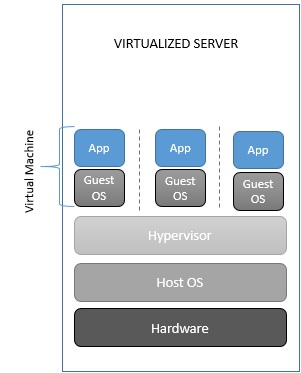
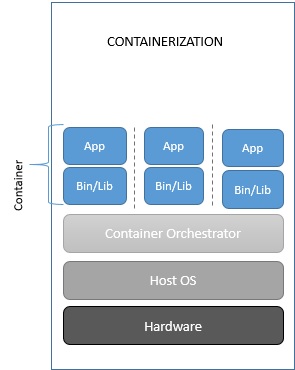
Benefits of containerization
The key benefit of the containerization is to make it run anywhere. Containerization makes applications portable by virtualizing at the OS level, creating isolated, kernel based, encapsulated system.
Apart from portability, the other benefit is, it requires far a few resources. For instance- you can run a lot of containers without consuming too much of space, as you are sharing the OS.
Below are some of the key benefits-
- Sharing a kernel means you can put more applications on a single server. Containerization removes the OS layer, instead sharing the same kernel with the host and other apps makes the containers much smaller in size. So, you can run lot more containers on a single machine.
- Sharing also enables containerized apps to launch faster than a virtual machine. Because they are running on the same kernel, containers are already booted up, makes them to launch much faster than the Virtual Machines that require to boot up its own OS on launch.
- Supports a more unified DevOps culture. Containers deployment can be automated and integrated with the CI/CD pipelines using the tools like Jenkins/VSTS, making it faster to reach the market.
Things to remember while containerizing
Before we even talk about the road to containerization, though, we should first consider whether you should containerize in the first place. Below are the points/questions we should remember/ask before strategizing the containerization-
- Service/App should be stateless.
- An app being containerized shouldn’t contain any environment config.
- Containers are meant to house a single process. For example, you wouldn’t want to include your app tier and your web tier in the same container.
- You should be aiming to promote a single build-up through environments instead of generating a build per environment.
- Is the App Pre-Packaged as a Single Binary or JAR File?
- Is the Platform on Which Your App Is Built Available in a Containerized Version or Package Yet?
- Are Any of Your Third-Party Apps Available in a Container Version Yet?
- Is Your Application Already Part of Continuous Integration/Continuous Deployment Pipeline?
Path To Cloud For Existing .Net Applications
Now since we have discussed enough about the containerization, we’ll discuss how can we move to cloud (Azure to be specific) the existing .Net applications, that may eventually need to containerize these apps.
Organizations typically choose to move to the cloud for the agility and speed they can get for their applications. You can set up thousands of servers (VMs) in the cloud in minutes, compared to the weeks it typically takes to set up on-premises servers.
There is not a single-fit-to-all strategy available while moving to cloud, it depends on priorities and the business needs of the organization. Not all applications need to move to PaaS model or Cloud Native development model at once. In most of the cases you need to move to cloud maturity model in a phased manner.
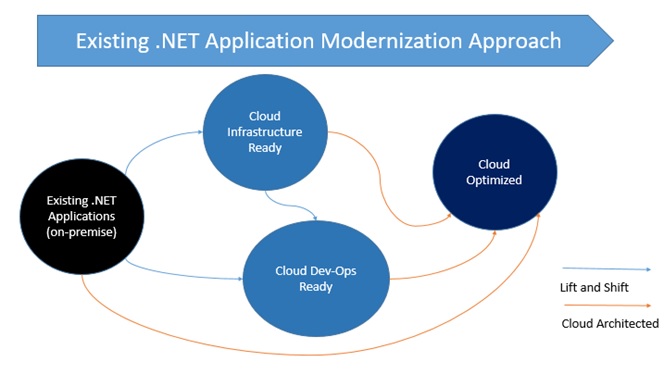
Each migration approach has different set of benefits, you can choose any one or components from multiple approaches as a hybrid approach, containing certain components from on premise and rest from cloud.
Below are different levels of maturity to move to cloud-
- Level 1- Cloud Infrastructure-Ready: In this migration approach, you simply re-host or move your application to an Infrastructure-As-A-Service platform provided by the cloud provider. Your apps remain same code and architecture wise, just you move them to VM on the cloud.
- Level 2– Cloud DevOps Ready: At this level, after initial lift-and-shift, you can gain more advantages of the cloud without re-architecting and re-coding. You improve the agility of the apps to ship faster by better implementing the DevOps in your application lifecycle. You can do so by using Windows Containers, that uses Docker Engine and integrate it with the CI/CD pipeline, you can also take benefit by using more cloud managed services related to data, monitoring etc.
- Level 3– Cloud-Optimized: This maturity model is the end goal and driven by business need of your organization. In this model, you take advantage of PaaS platform of the cloud. You write Cloud Native apps and Microservices architecture to evolve long term agility and to scale to new limits. New code must be written when you need to write cloud native apps or microservices. The benefits of this approach are difficult to achieve in Monolithic or on premise architecture.
Key Technologies And Architectures By Maturity Level
Most existing .NET applications might nowadays be based on .NET Framework 4.x, or even on .NET Framework 3.5, and use web frameworks like ASP.NET MVC, ASP.NET Web Forms, ASP.NET Web API, Windows Communication Foundation (WCF), ASP.NET SignalR, and ASP.NET Web Pages. These established .NET Framework technologies depend on Windows. That dependency is important to consider if you are simply migrating legacy apps and you want to make minimal changes to your application infrastructure.
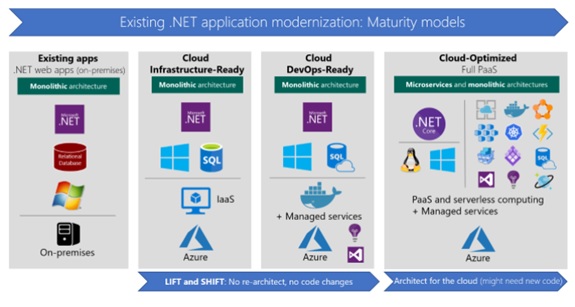
- Cloud Infrastructure-Ready (Re-host or basic lift and shift): As a first step, many organizations want only to quickly execute a cloud-migration strategy. In this case, applications are simply rehosted to cloud using IaaS platform. Most rehosting can be automated by using Azure Migrate, a service that provides the guidance, insights, and mechanisms needed to assist you in migrating to Azure based on cloud tools like Azure Site Recovery and Azure Database Migration Service. You can also do the rehosting manually. For example, you can move your applications to VMs in Azure with very little modification-probably with only minor configuration changes. The networking in this case is similar to an on-premises environment, especially if you create virtual networks in Azure.
- Cloud DevOps-Ready (improved lift and shift): This model is about making a few important deployment optimizations to gain some significant benefits from the cloud, without changing the core architecture of the application. The fundamental step here is to add Windows Containers support to your existing .NET Framework applications. This important step (containerization) doesn’t require touching the code, so the overall lift and shift effort is very light. Visual Studio automatically chooses smart defaults for ASP.NET applications and Windows Containers images. These tools offer both a rapid modification, and a fast path to get the containers to Azure. Your agility is improved when you deploy to multiple environments. Then, moving to production, you can deploy your Windows Containers to orchestrators like Azure Service Fabric or Azure Container Service (Kubernetes, DC/OS, or Swarm). During this initial modernization, you can also add assets from the cloud, such as monitoring with tools like Azure Application Insights; CI/CD pipelines for your app lifecycles with Visual Studio Team Services; and many more data resource services that are available in Azure. For instance, you can modify a monolithic web app that was originally developed by using traditional NET Web Forms or ASP.NET MVC, but now you deploy it by using Windows Containers. When you use Windows Containers, you should also migrate your data to a database in Azure SQL Database Managed Instance, all without changing the core architecture of your application.
- Cloud-Optimized: As discussed earlier, the ultimate goal when you modernize applications in the cloud is basing your system on PaaS platforms like Azure App Service. PaaS platforms focus on modern web applications, and extend your apps with new services based on serverless computing and platforms like Azure Functions. The second and more advanced scenario in this maturity model is about microservices architectures and cloud-native applications, which typically use orchestrators like Azure Service Fabric or Azure Container Service (Kubernetes, DC/OS, or Swarm). These orchestrators are made specifically for microservices and multi-container applications. All these approaches (like microservices and PaaS) typically require you to write new code-code that is adapted to specific PaaS platforms, or code that aligns with specific architectures, like microservices.

When you decide to move to cloud you not necessarily move big bang. You don’t need to re-architect or re-code your application from day one, To optimize the cost-effectiveness of your organization’s cloud migration strategy, it’s important to consider the needs of your business and requirements of your apps. You’ll need to determine:
- Which apps require a transformation or re-architecting.
- Which apps need to be only partially modernized.
- Which apps you can “lift and shift” directly to the cloud.
References
https://codefresh.io/containers/things-consider-containerizing-app/
https://docs.microsoft.com/en-us/azure/service-fabric/service-fabric-quickstart-java-spring-boot
https://docs.microsoft.com/en-us/dotnet/standard/modernize-with-azure-and-containers/
NET-Microservices-Architecture-for-Containerized-NET-Applications-(Microsoft-eBook)
 Alok's blog